Table of Contents
Do you know that 90% of mobile time is spent on apps? This surging demand shows the necessity of mobile apps for modern business.
The global mobile app development market is projected to grow from $145 billion in 2025 to over $553 billion by 2033, driven by increasing smartphone usage and enterprise digital transformation. At the same time, global app revenues are expected to cross $673 billion by 2027, signaling massive demand for scalable, high-performance applications.
Nowadays, companies want to create standalone mobile applications for major platforms, such as iOS and Android. However, building mobile apps individually for iOS and Android can be challenging in design, development, and maintenance.
This is exactly where hybrid app development has gained momentum.
Instead of building two separate applications, hybrid apps allow businesses to use a single codebase across platforms, drastically reducing development time and cost. In fact, hybrid solutions can reduce development costs by 40–60% and speed up delivery timelines by up to 50% compared to native approaches.
For businesses based in the USA, UK, or UAE across industries like healthcare, finance, education, e-commerce, and more, speed and efficiency are becoming a strategic advantage. Sector-wide businesses that can launch their solutions faster, iterate feedback more quickly, and optimize as per budgets are the ones winning market share.
That’s why hybrid app development has become a strategic choice, and decision-makers must take a deep dive into this bifurcation to better understand.
What is a Hybrid Application?
As the name ‘hybrid’ suggests, hybrid mobile app development is a blend of both native and web applications. Think of hybrid apps as a web app running inside a native shell.
- The user downloads it from the App Store or Google Play.
- It looks and behaves like a native app.
- But behind the scenes, much of the logic is shared across platforms.
These applications are popular because they allow developers to write code for mobile apps once and still accommodate multiple platforms. Hybrid app development has gained popularity all over the world, yet many businesses think, “When should I take a hybrid app development approach?” or “Which one should I choose between Hybrid and Native apps?”
Hybrid vs Native Apps: Which One Should You Choose?
Choosing between hybrid and native isn’t about mobile app development trends but about trade-offs across cost, performance, and long-term scalability.
Both approaches are technically sound. The difference lies in how they impact your time-to-market, engineering effort, and total cost of ownership.
| Factor | Hybrid Apps | Native Apps |
| Codebase | Single (shared across platforms) | Separate for iOS & Android |
| Development Time | Shorter (parallel deployment) | Longer (platform-specific builds) |
| Cost | Lower initial + maintenance cost | Higher due to duplication of effort |
| Performance | Near-native (framework dependent) | Fully optimized |
| Scalability | Good for most business apps | Best for high-performance systems |
Top 5 Reasons to Choose Hybrid App Development
The questions may have been answered, but it also brings us closer to the reasons why businesses often choose hybrid apps over Native. To get an answer based on your preferences and requirements, take a look at these reasons below.
1. Native-Like Experience: Hybrid apps provide most of what native user experience (UX) offers, and the sleek backend structure. The users of the hybrid app experience a fluid native feel, even if they shift from one device to another.
2. Budget-Friendly App Development: Budget is a primary concern for every business looking to develop a robust business mobile app. The hybrid mobile app development is budget-friendly for sure, as it typically reduces development costs compared to native apps.
3. High-Speed Performance: When compared with other mobile development options, hybrid mobile apps are faster than mobile web apps or responsive websites. Hybrid apps offer strong performance for most use cases and run quickly on all types of device screens.
4. Multi-Platform Support: Hybrid applications’ performance across different platforms depends on the framework used to build the apps.
5. Offline Support: Offline support of any hybrid app could be one of the most rewarding features in today’s time. In hybrid apps, users can store specific data locally due to the device’s API as offline storage.
Top 7 Emerging Cross-Platform Frameworks to Build Sleek Hybrid Mobile Apps
Now that you understand the basics about hybrid app development, it’s time to take a look at some of the most prominent frameworks that you can use to achieve your desired app goals. Let’s delve deeper and go through all the latest cross-platform frameworks for hybrid app development.
1. React Native
React Native is one of the most popular frameworks. Developed by Facebook, the React Native app development is the most popular among developers. It enables cross-platform apps with near-native performance. Developers prefer the React Native framework because it allows them to develop a cross-platform app and grant a native-like experience to the end-users.
React Native is extensively used to create iOS and Android apps with a single JS codebase. App developers who are well-versed in JavaScript love to work on the React Native framework and make innovative mobile applications.
Key features of React Native:
- Supports Node.js
- High-powered, delivered with native code
- Ready-to-use elements for faster development
- Use the same codebase between iOS and Android
- Hot deployment without the need for the developer to save changes
- Provides automatic error detection
- Backed by a vast community of developers
- Features live reloading with two different screens
2. Flutter
Flutter is an app SDK for building high-performance, high-fidelity apps for iOS, Android, and web apps from a single codebase. It’s Google’s toolkit for creating visually stunning cross-platform apps. Flutter stands a good chance to outshine the traditional hybrid mobile app development tools in the future.
Also, Flutter sets a go-to choice when you need to quickly craft an aesthetically appealing and interactive MVP. Its flexible design components let developers craft a stunning UI in very little time. To put it simply, it’s a power-packed toolkit for hybrid app development services.
Key features of Flutter:
- A fast and flexible framework
- Real-time updates without stopping for changes
- Compatible with multiple operating systems
- Extensive choice of widgets for easy customization
- Open-source technology accessible to all developers
3. Ionic
Ionic is one of the promising, feature-rich, easy-to-use frameworks for building hybrid mobile applications. This framework is an open-source SDK and is based on CSS. Developers highly prefer this framework for cross-platform app development, as it is easy to learn and enjoyable to use.
Ionic has a rich library with front-end building and premier user interface (UI) components that allow developers to build amazing Progressive Web Apps (PWAs). Ionic helps developers achieve UI design aspects like image design and placement, typography, innovative themes, and more.
Key features of Ionic:
- Provides a rich collection of amazing features
- Develop once and apply them across all platforms
- Easy-to-maintain code with faster development
- Well-tested programming languages
- Live reloading system and app enabling preview
- Provides you with debugging tools
- Backed by a large developer community
4. Xamarin
Xamarin is known as the hottest framework for building cross-platform hybrid mobile apps with a native look and feel. It is known to abide by the WORA (Write once, Run anywhere) concept that allows developers to leverage the same code for different OS, including Windows, Android, iOS, and macOS.
Using the C# language for coding, apps built with Xamarin show absolute prowess. C# coding allows Xamarin to use .NET features and leverage native API access for its apps. On Xamarin’s official forum and third-party websites, it has a vast community and substantial support.
Key features of Xamarin:
- Backed by Microsoft, supporting all technical aid
- Over 70% code is reusable between iOS and Android
- Ensures the same level of performance as a native mobile app
- Provides you with platform-specific features to supplement the general codebase
- Simplified testing
5. jQuery Mobile
Among all the hybrid app development frameworks, jQuery Mobile takes a different approach in delivering cross-platform mobile apps. It is an HTML-based, touch-optimized, JavaScript library used to make responsive websites that are easily accessible on all smartphones.
Besides, jQuery Mobile is a fantastic framework for organizations that believe in BYOD’s ideology (Bring Your Own Device) as it provides support for various operating systems.
Key features of jQuery Mobile:
- A stable framework to work upon comfortably
- Ensures the screen’s responsiveness with size and different devices
- HTML5 and JavaScript make the development pretty easy
- Convenient menus make apps extremely user-friendly
- Includes an add-on for creating custom themes
- No additional knowledge is required to master it
6. Solar2D
Solar2D is an apt choice if you want to add bright and appealing graphics to your apps, which is often the case for the gaming industry. It is a reliable cross-platform mobile app development for enterprises, education, and 2D games that is 4x faster.
With Solar2D, commercial software providers can easily rely on fast monetization of their apps. It utilizes Lua as a scripting language in real-time testing.
Key features of Solar2D:
- Developers can instantly see the changed results
- Convenient simulator equipped with necessary features
- Well-thought-out API.
- Detailed guidelines to help you master all the framework’s elements
- Powered by a Lua-based framework, a light-weight scripting language
7. Mobile Angular UI
Mobile Angular UI is a good framework choice for anyone using Bootstrap or AngularJS comfortably. It can be considered an extension of the existing Bootstrap 3 without any dependencies on Bootstrap JS libraries or jQuery. Also, there are several UI components like scrollable areas, navbars, switches, overlays, and more.
With the use of Mobile Angular UI, developers can build seamless mobile applications. This framework ensures that users are treated with a smooth, intuitive, and appealing user interface (UI).
Key features of Mobile Angular UI:
- Comes with fastclick.js and overthrow.js for the best user experience
- Open-source and available for free
- Offers optional libraries as a bonus
- No dependency on jQuery or any other library
- Makes the app design completely responsive
What is the Step-By-Step Hybrid App Development Process?
You must understand that choosing the right approach and framework is only part of the equation. The way the development process is structured and executed is what ultimately determines the success of a mobile app. A well-defined hybrid app development process that is Agile yet systematic ensures product efficiency aligned with business goals, user expectations, and long-term scalability.
To get a segmented understanding of every step, take a look below.
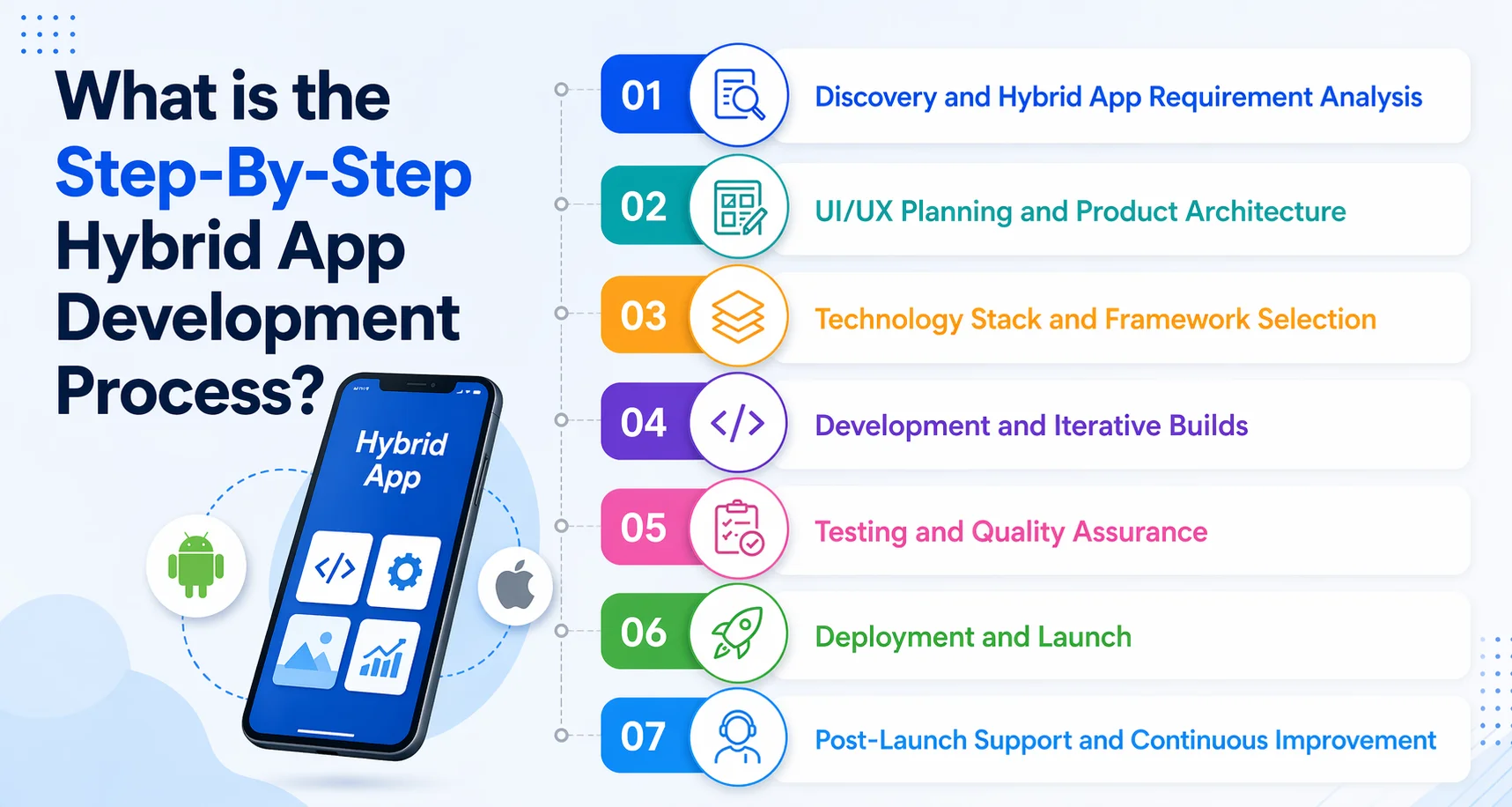
Step 1: Discovery and Hybrid App Requirement Analysis
The first and foremost thing you must do is to focus on understanding business objectives, target users, core features, and technical constraints. Instead of jumping straight into development, you must map out what the product needs to achieve and how it will be used. This helps avoid unnecessary rework later and ensures the development effort aligns with real business outcomes.
Step 2: UI/UX Planning and Product Architecture
Once you are clear with the requirements, the focus shifts to structuring the application based on user flows and navigation, wireframes or design prototypes, and the app architecture. In hybrid mobile app development, this step is imperative and takes time because the goal is to create an augmented experience across platforms.
Step 3: Technology Stack and Framework Selection
Once the design phase is completed, the development team, with your input, finalizes the hybrid app development frameworks like React Native or Flutter, backend technologies, and APIs.
You must make this decision after heavy consideration of factors like performance requirements, scalability needs, and long-term maintenance. Choosing the right stack early prevents technical limitations as the product grows.
Step 4: Development and Iterative Builds
Once the hybrid mobile app development frameworks are finalized, you must begin with the development by following an iterative approach, where features are built, tested, and refined in cycles. This approach allows teams to release working versions early and improve them based on feedback.
Step 5: Testing and Quality Assurance
Once the source code is ready, the testers begin testing beyond functionality, including cross-platform compatibility, performance, UI consistency checks, and device-specific validations. Since the same code runs across multiple platforms, thorough testing ensures that the app performs reliably in different environments.
Step 6: Deployment and Launch
Once the app meets quality standards, it is prepared for deployment on:
- Apple App Store
- Google Play Store
This phase includes:
- App store compliance checks
- Build optimization
- Final performance validation
A structured deployment process reduces the chances of rejection and ensures a smoother launch.
Step 7: Post-Launch Support and Continuous Improvement
Launching the app is not the end but the beginning of the next phase. After release, teams focus on monitoring performance and user behavior, fixing bugs and optimizing features, and rolling out updates based on feedback. Hybrid apps make this process more efficient, as updates can often be managed across platforms with minimal duplication of effort.
How Much Does Hybrid App Development Cost in the USA?
The cost of hybrid app development is often the deciding factor when businesses evaluate it. While the exact investment varies from project to project, having a realistic benchmark helps in planning and decision-making.
| App Type | Features | Estimated Cost (USA Market) |
| MVP / Basic App | Core features, simple UI, limited integrations | $35,000 – $70,000 |
| Mid-Level App | Custom UI, APIs, user roles, moderate complexity | $70,000 – $150,000 |
| Enterprise App | Advanced features, scalability, integrations, and high performance | $150,000+ |
Keeping this in mind, the hybrid app development cost ranges between $35,000 to $150,000 and can be more based on your requirements and goals.
Why Choose AppsChopper as Your Trusted Hybrid App Development Company?
The rise of hybrid apps reflects the fact that they provide brands with the convenience of launching one application across a variety of mobile devices and maximizing their reach while saving both time and money.
Hybrid app development has made it possible to code once and run apps on multiple platforms. Not only is building a hybrid app quicker and easier, but your brand will also be more accessible and sought-after if you offer your app on multiple platforms, such as Android and iOS.
AppsChopper is a hybrid app development company that can help you create this type of app for your business. Our team is well-versed with these and additional frameworks; we know what tools to use that will enable you to bring a native app-like feel and ensure a more viable, time-efficient solution, without the hassle. Just ask our clients, who have left us an average of 4.9 rating on top platforms like Clutch.
Frequently Asked Questions
Q1. Is hybrid app development the same as cross-platform development?
Not exactly. While both aim to run a single codebase across multiple platforms, they differ in approach. Hybrid app development typically uses web technologies (HTML, CSS, JavaScript) wrapped inside a native container, whereas cross-platform development uses frameworks that render native components or near-native experiences. In simple terms, all hybrid apps are cross-platform, but not all cross-platform apps are hybrid.
Q2. How is hybrid app development different from native app development?
Native app development involves building separate apps for platforms like iOS and Android using platform-specific languages (Swift, Kotlin), offering the best performance and full access to device features. Hybrid apps, on the other hand, use a single codebase and run inside a web view or container, making development faster and more cost-effective. However, hybrid apps may have limitations in performance and deep hardware integration compared to native apps.
Q3: Which technologies are used in hybrid app development?
Hybrid app development primarily relies on web technologies such as HTML5, CSS3, and JavaScript, along with frameworks like Ionic, Cordova, and Capacitor. Modern cross-platform frameworks like React Native and Flutter are also widely used, although they go beyond traditional hybrid approaches by offering more native-like performance and UI rendering.
Q4: How long does it take to develop a hybrid mobile app?
The development timeline depends on the app’s complexity, features, and integrations. A basic hybrid app can take around 2–3 months, while a mid-level app may take 3–6 months. More complex, enterprise-grade applications with advanced features and integrations can take 6+ months. Hybrid development generally reduces timelines compared to native development due to a shared codebase.
Q5: What industries benefit most from hybrid app development?
Hybrid app development is especially beneficial for industries that require faster time-to-market and cost efficiency. These include eCommerce, healthcare, fintech, education, travel, and on-demand services. Businesses in these sectors often need apps that work across platforms without the overhead of maintaining separate native codebases.