Table of Contents
With the impending time, the perception of mobile apps has changed. What was once solely used for the services is now considered a business touchpoint that represents the brand to users. They are becoming an interactive layer between the company and its customers.
Keeping that in mind, the mobile app’s visual appearance, interface, and information accessibility hold value worth discussion. They are the advocates of modernized businesses. Since such is the premise, decision-makers are focusing more on the modern mobile app design and how to make it align with the users who have a tendency to bounce at any inconvenience.
This is exactly why they have been hiring mobile app UI/UX design companies who assist them in changing the prerogative throughout. While we know that some of them have made decisions, some are still in the process of moving ahead. Since you, a brand-image-focused decision-maker, here we present our bifurcation of the purpose of UI UX design, with everything you need to know.
So let’s begin with the design guide and clear up any persistent doubt.
What is Mobile App Design?
The process of planning, structuring, and designing in context for the mobile app is called mobile app design. This is a segment of the mobile app development lifecycle that deals with the user experience so that they do not bounce away.
Some may misunderstand this as the aesthetic-focused phase, but it is more than just that. It is about building convenient designs that are worth discussing when creating something specific for an audience. Keeping the essential focus in mind, effective mobile app design focuses on:
- How users navigate the app
- How easily they complete tasks
- How the app feels while being used
- How efficiently does it support business goals
At its core, UI/UX developers combine UX (User Experience) and UI (User Interface) to create apps people actually want to use, and continue using.
What is UX and UI?
Although often used interchangeably, there is a difference between UI and UX. While they do serve different but complementary purposes.
- UX design focuses on how the app works
- UI design focuses on how the app looks and feels
Together, they shape the complete mobile experience.
UI VS UX Design in Mobile Apps
Think of UX as the architecture of a building and UI as the interior design. A visually stunning app with poor UX will frustrate users, while a functional app with weak UI will struggle to build trust or engagement.
The overlapping needs to be understood well with a table that gives you a proper understanding.
| Aspect | UI Design (User Interface) | UX Design (User Experience) |
| Focus | Visual presentation and interaction | Overall user journey and usability |
| Purpose | Make the product look intuitive and appealing | Make the product easy, efficient, and satisfying to use |
| Scope | Screens, buttons, icons, colors, typography | Research, flows, structure, behavior, usability |
| Key Activities | Visual design, layout, micro-interactions | User research, wireframing, testing, iteration |
| Tools Used | Figma, Sketch, Adobe XD | Figma, FigJam, Maze, usability testing tools |
| Output | High-fidelity screens and UI components | User flows, wireframes, prototypes, insights |
| Success Metric | Visual clarity and consistency | Task completion, satisfaction, retention |
| Business Impact | Strengthens brand perception | Improves conversions and user retention |
Examples of UI and UX That are Worth Understanding and Implementing
Understanding UI and UX design becomes far more meaningful when viewed through practical, real-world examples. These patterns are widely adopted across successful mobile applications, not because they look good, but because they consistently improve usability, engagement, and conversions.
This section highlights commonly implemented UI/UX design examples that have proven their value across industries.
Common User Interface Examples
These are the good UI design examples that are worth discussing.
| Example | What It Does | Why It Works |
| Clear Call-to-Action Buttons | Highlights primary actions visually | Reduces decision fatigue and increases conversions |
| Bottom Navigation Bar | Enables quick access to key sections | Matches user expectations on mobile |
| Visual Hierarchy | Uses typography and spacing to guide focus | Improves scannability and comprehension |
| Micro-Interactions | Provides visual feedback for actions | Builds confidence and perceived quality |
| Consistent Color & Icons | Maintains uniform visual language | Strengthens brand trust and familiarity |
Common UX Design Examples
Coming to the UX design, the mentioned are preferred for the mobile apps.
| Example | UX Optimization | Why It Works |
| Simplified Onboarding | Introduces app value with minimal steps | Reduces early drop-offs |
| Logical User Flows | Minimizes steps to complete tasks | Improves task completion rates |
| Clear Error Messages | Explains issues and recovery steps | Reduces frustration and abandonment |
| Accessibility-Friendly Design | Supports diverse user abilities | Improves usability for all users |
| Feedback-Driven Iteration | Refines experience using real data | Keeps the app relevant and user-centric |
Why is Modern Mobile App Design Imperative for Enterprise-Level Growth?
Since the examples are discussed and will be further explained, you may be wondering about the reasoning as to why they are imperative. The question is essential when there is an investment on the line.
Well, to be brief, the segment talks about the user experience and how a well-to-do app makes it happen. They focus on their aspects that are significant for the ROI and modernize as per the requirement.
To comprehend the benefits, take a look at the pointers mentioned below.
Heightened User Retention
As we have mentioned above, often, the users have the tendency to bounce off. If they don’t like the UI and UX, they leave the app and move on to the one that prioritizes it. However, when you focus on UX and UI design styles better, the retention rate increases. The users find the business mobile app worth their time and experience the services or buy the product that you are providing.
Boosted Conversion Rate
Once the retention rate is increased, this automatically leads to a boost in the conversion rate. They spend time on the mobile app, make sure to scroll through to locate what they are looking for, and if faced with no issue, they move on with their decision. The convenience and the retention rate are directly proportional to the conversion rate based on the best mobile UI and UIX.
Exceptional Brand Perception
When all is well because the app design and UI/UX are bringing in the users to convert them into customers or leads, the brand gains perception. Their overall value increases and subsequently changes the industry’s reputation. It is better to say that everything is interconnected with each other and ensure there is a revenue-focused stream.
Mobile App Design Best Practices and Principles To Focus on
To say that design is not all about the aesthetic is false. A structure assists you in moving on and bringing forth a layman-centric mobile app. In following the necessary steps, you must remember that there are certain practices that need to be followed.
However, to think that you can follow them on your own is an overstatement. You always need the best UI UX agency that can assist you with the practices that are mentioned below. The reasoning is that they have been designing apps for a while and have experience in bringing what’s best in your interest.
To have an understanding of the principle, the table below brings together each and every aspect that is essential when moving on with the mobile app design.
| Principle | What does it mean in Practice? | Why It Matters? |
| Simplicity and Clarity | Focused screens, minimal elements, clear actions | Reduces cognitive load and improves usability |
| Consistency | Uniform layouts, colors, typography, and interactions | Builds familiarity and user trust |
| Accessibility and Inclusivity | Readable text, sufficient contrast, touch-friendly controls | Expands reach and improves UX for all users |
| Responsiveness Across Devices | Adaptive layouts for different screen sizes | Ensures seamless experience on all devices |
| Feedback and Micro-Iterations | Visual or motion cues for user actions | Reassures users and enhances engagement |
| Performance-Based Design | Lightweight visuals and optimized interactions | Faster apps lead to higher retention and satisfaction |
Step-By-Step Mobile App Design Process
A successful mobile app doesn’t start with screens or colors but with clarity. A structured design process ensures that every design decision is intentional, user-focused, and aligned with business goals.
Here’s how a well-planned mobile app design process typically unfolds when you hire UI UX designers.
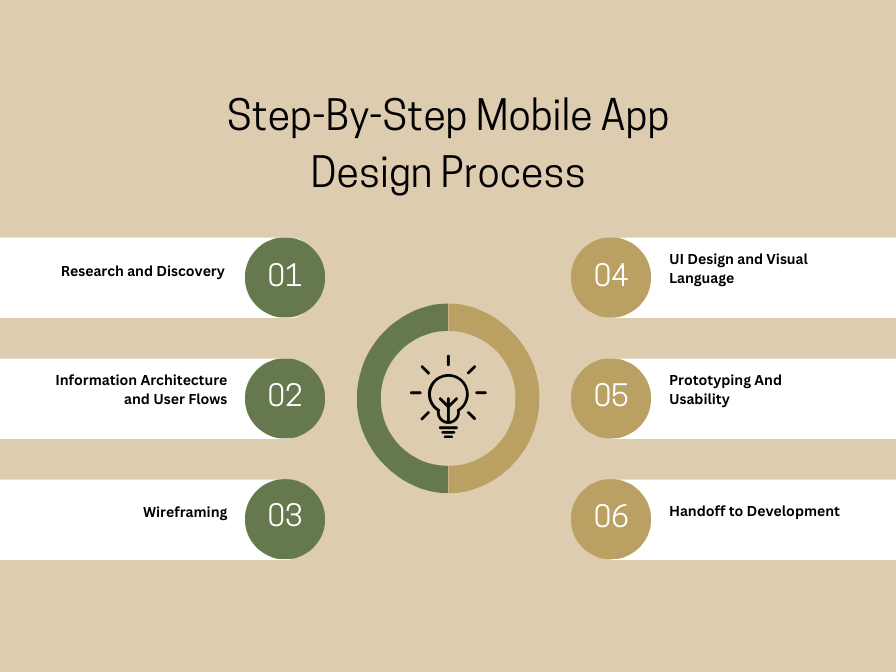
 1. Research and Discovery
This is where the foundation is laid with strong research that reduces guesswork and ensures the product is designed for real user needs, not internal opinions. Before any design begins, it’s essential to understand:
- Who the users are?
- What problems they’re trying to solve?
- What the business aims to achieve?
- How competitors are approaching similar challenges?
Research may include user interviews, market analysis, and reviewing existing data.
Skipping this step often leads to designs based on assumptions, one of the most common reasons apps fail.
2. Information Architecture and User Flows
Once insights are gathered, the next step is to organize the information logically to provide a clear information architecture that prevents confusion and helps users complete tasks faster and with less effort. This involves:
- Structuring app content
- Defining navigation
- Mapping how users move from one task to another
User flows help visualize how a user completes actions like signing up, browsing, or making a purchase.
3. Wireframing
Wireframes act as the blueprint of the app, as they ensure the app is usable before it’s beautiful.
At this stage:
- Layouts are sketched without visual styling
- Focus remains on structure, hierarchy, and usability
- Ideas are validated early, before time is spent on visuals
Wireframing allows user experience designers to spot usability issues early, when changes are easier and more cost-effective.
4. UI Design and Visual Language
With a strong structure in place, the focus shifts to visual design, where it builds trust, reinforces brand identity, and improves overall engagement.
This includes:
- Colors, typography, and iconography
- Brand alignment
- Creating a consistent visual system
UI design brings personality to the app while maintaining clarity and consistency across screens.
5. Prototyping And Usability
Designs are then transformed into interactive prototypes that simulate real user interactions for usability testing, ensuring the app works as intended, for actual users, not just designers.
These prototypes are tested with users to:
- Identify friction points
- Validate assumptions
- Refine interactions based on feedback
Testing at this stage helps uncover issues before development begins.
6. Handoff to Development
The final step ensures a smooth transition from design to development, for strong collaboration reduces rework, saves time, and results in a more polished final product.
This includes:
- Sharing design specifications
- Providing reusable components
- Aligning closely with developers
A clear handoff minimizes misinterpretation and ensures design intent is preserved during implementation.
UI/UX Design Tips and Guidelines Used for Android and iOS
Now that we have understood the basics, it is time to take it up a notch with the specifics. This lies in the types of platforms you are building the app for. Since there are Android and iOS, you may want to focus on the idea that both have different ranges of devices, have distinctive functionalities, and thus, require a different approach to build design as per their users.
Since that is the premise, here we bring forth some UI UX design trends and tips that are specific to iOS and Android. Take a look at the table mentioned below.
| Aspect | iOS (Apple Human Interface Guidelines) | Android (Material Design) |
| Design Philosophy | Clarity, depth, and focus on content | Bold visuals, motion, and flexible layouts |
| Primary Guideline | Apple Human Interface Guidelines (HIG) | Google Material Design |
| Navigation Pattern | Tab bars, navigation bars, swipe gestures | Bottom navigation, navigation drawer |
| Back Navigation | Gesture-based (swipe back) | System-level back button |
| Typography | San Francisco (system font) | Roboto (system font) |
| Icon Style | Minimal, precise, consistent strokes | Bold, geometric, expressive icons |
| Use of Motion | Subtle, purposeful animations | More prominent motion and transitions |
| Buttons & CTAs | Text-based, minimal emphasis | Contained, outlined, or floating action buttons |
| Design Consistency | Strict adherence to platform rules | Flexible but guideline-driven |
| Accessibility Focus | VoiceOver, Dynamic Type | TalkBack, scalable UI components |
| User Expectations | Polished, intuitive, premium feel | Customizable, functional, adaptive experience |
Preferred UI UX Technologies That Can Be Used
To diversify and bring a better understanding, we must focus on the technology as well that you are going to be using. While this can be assisted with the ui ux services providers, we think the comprehension towards the frontend, core web, and cross-platform for specific apps should be provided at our end.
To make sure that the technologies for specific UI/UX needs are clear, here we go with the table.
| Category | Technology |
| Core Web | HTML |
| CSS | |
| JavaScript | |
| Frontend Frameworks | React |
| Vue | |
| iOS UI | SwiftUI |
| Android UI | Jetpack Compose |
| Cross-Platform | Flutter |
| React Native | |
| Design Systems | Component Libraries |
| Accessibility | ARIA |
What are the Popular UI UX Design Tools?
When you design a mobile app, the tools you use directly shape how efficiently ideas turn into real, usable experiences. As a business or product owner, understanding popular UI/UX design tools helps you make informed decisions, whether you’re building an in-house team or working with a design agency.
These tools support every stage of the mobile app design process, from wireframing and prototyping to user testing and developer handoff. More importantly, they help you validate design decisions early, reduce costly revisions, and ensure the final product aligns with both user expectations and business goals.
The tools listed below are widely adopted across the industry and are trusted by designers to create intuitive, scalable, and user-centered mobile app experiences.
| Category | Tools |
| UI Design | Figma, Sketch, Adobe XD |
| Wireframing | Balsamiq, Whimsical |
| Prototyping | InVision, ProtoPie, Axure RP |
| User Research & Testing | Maze, UserTesting, Lookback |
| Collaboration & Ideation | FigJam, Miro |
| Design Handoff | Zeplin, Avocode |
| Design Systems | Figma Libraries, Storybook |
| Accessibility Testing | Stark, Accessibility Insights |
UI/UX Design Trends That Businesses Should Follow for Augmented User Experience
If you want your app to stand out and keep users coming back, you need to stay ahead of design trends that actually improve usability and engagement. In today’s fast-moving digital world, trends aren’t just about visuals but about how your app interacts with users, adapts to their needs, and delivers meaningful experiences.
By understanding and implementing the right UI/UX trends, you can make sure your app feels modern, intuitive, and engaging, while also supporting your business goals. From minimalistic interfaces to AI-driven personalization, these trends show you how to create apps that don’t just look good, but work exceptionally well.
In the table below, you’ll find a mix of proven design principles and emerging technologies that you can adopt to enhance your app’s user experience, accessibility, and overall performance. Following these trends will help you stay competitive, delight your users, and make smarter design decisions.
| Trend | What It Focuses On | Why It Matters |
| IoT Integration | IoT Integration | Allows seamless interaction across multiple devices |
| AR and VR | Overlaying digital elements with an immersive experience | Enhances engagement and provides immersive experiences |
| Machine Learning (ML) | Predictive UI behavior and personalization | Improves recommendations, automates user flows, and adapts UX dynamically |
| Artificial Intelligence (AI) | Intelligent automation, chatbots, and adaptive UI | Enhances efficiency, personalizes experience, and supports decision-making |
| Modern Dashboard UI Design | Interactive analytics, data visualization, and real-time insights | Provides actionable insights, improves decision-making, and enhances usability for complex apps |
| Minimalistic UI | Clean layouts and focused content | Reduces cognitive load and improves usability |
| Dark Mode Design | Low-light friendly interfaces | Enhances comfort and saves battery |
| Micro-Interactions | Subtle animations and feedback | Improves engagement and usability |
| Voice-Enabled Interfaces | Voice commands and navigation | Supports hands-free and accessible use |
| AI-Driven Personalization | Adaptive content and UI | Creates tailored user experiences |
| Gesture-Based Navigation | Swipe and touch interactions | Enables faster, more intuitive navigation |
| Accessibility-First Design | Inclusive and usable interfaces | Expands reach and improves UX for all |
| Motion-Driven UX | Meaningful transitions and animations | Guides users through actions |
| Cross-Platform Design Systems | Unified design across platforms | Ensures consistency and scalability |
| Data-Informed Design | UX decisions backed by analytics | Improves outcomes through real user insights |
How Much Does UI UX Design Cost?
If you’re planning to build or redesign a mobile app, one of the first questions you probably ask is: “How much is this going to cost me?” Understanding mobile app design cost isn’t just about numbers. It’s about knowing what you’re paying for, why it matters, and how it impacts your app’s success.
You need to consider several factors: the complexity of your app, the platform you’re designing for, the level of customization, and the expertise of the team you work with. The right investment in UI/UX design can save you time, reduce costly rework, and help you deliver an app that delights users, improves retention, and drives business growth.
In the table below, we break down the key elements that affect UI UX design cost, so you can make an informed decision and plan your budget with confidence.
| Factor for UI UX Design Cost | What It Covers | Typical Mobile App Design Cost |
| Project Complexity | Number of screens, features, interactions | Basic App: $15,000–$25,000 Medium Complexity App: $25,000–$045,000 Complex App: $45,000–$700,000+ |
| Platform | iOS, Android, Cross-Platform | Single platform: Base cost Dual platform: +30–50% |
| Design Phase | Research, Wireframing, UI Design, Prototyping, Testing | Each phase contributes 10–30% of total cost |
| Additional Factors | Research, Wireframing, UI Design, Prototyping, Testing | Can increase total cost by 10–30% |
Why is AppsChopper Considered the Best UI UX Agency?
When you’re looking to create a mobile app that truly resonates with users, choosing the right partner for UI and UX design services can make all the difference. At AppsChopper, you get a team that not only understands design principles but also knows how to apply them strategically to meet your business goals. You’ll see the impact of thoughtful design in every interaction your users have, from intuitive navigation to visually engaging interfaces that feel natural and enjoyable.
You don’t just get a design team; you get a partner who focuses on understanding your users, your brand, and your objectives. By combining research-driven insights with cutting-edge tools and emerging trends, AppsChopper ensures that the apps you launch are not only visually appealing but also highly functional and user-centric. When you work with us, you’re investing in UI/UX design services that are proven to enhance engagement, boost retention, and deliver measurable business results.
Frequently Asked Questions
Which software is best for UI UX design?
For reliable and industry-standard UI and UX design, tools like Figma, Adobe XD, and Sketch are widely used. They help you create wireframes, prototypes, and high-fidelity designs efficiently while supporting collaboration and usability testing.
How to choose a UI UX design agency?
You should look for an agency that demonstrates proven expertise, a structured design process, and a strong portfolio. Check if they prioritize user research, accessibility, and measurable results to ensure your investment in UI and UX design services pays off.
How does UX/UI design impact ecommerce success?
Effective ecommerce mobile app design improves user engagement, conversion rates, and customer retention. By streamlining navigation, simplifying checkout flows, and making interactions intuitive, your ecommerce app can directly boost revenue and brand trust.
How often should a business update its UI/UX design?
You should review and update your UI/UX design regularly, at least once a year, or whenever analytics indicate usability issues. Frequent updates based on user feedback, technology trends, and design standards keep your app competitive and relevant.
What mistakes should businesses avoid when following UI/UX design trends?
Avoid copying trends blindly without considering user needs, neglecting accessibility, or skipping usability testing. Prioritize consistency, clarity, and evidence-based design to ensure trends enhance the experience rather than confuse users.