
Table of Contents
The testing process for apps was very basic in the early years of mobile devices, since most applications were developed on a single platform. The QA team did this manually to a large extent in order to check compatibility.
All was different with time!
Mobile app testing has become an important discipline in contemporary development. Today, businesses rely on structured mobile app QA testing processes to ensure applications perform reliably across devices and environments. Testing is an important element that enables high-performance, secure mobile applications, as validation occurs during early development phases.
The primary concern of the business owners is the mobile application testing process, ensuring the app performs as the business owner wants and is properly secured against cyber threats. There will be further development of mobile devices, and testing can be further developed as well.
Businesses today rely on professional mobile app testing services alongside comprehensive development to ensure their applications are reliable, secure, and ready for real-world usage.
Many organizations also partner with a mobile app consulting team early in the process to define a scalable testing strategy aligned with business goals.
In this mobile app testing guide, we will discuss the importance, types, step-by-step process, best tools and frameworks, and best practices that set good QA apart from great QA.
Now, without any more preludes, let us start.
What Is Mobile App Testing?
Mobile app testing is the process of evaluating a mobile application to ensure it functions as expected, complies with security measures, provides a smooth user experience, and is compatible with various devices and operating systems.
Organisations usually decide to contract testers for mobile applications to make sure that there is a professional assessment and comprehensive testing of applications.
Thorough testing as a component of overall app development services is important for eliminating launch risks and providing reliable, high-quality mobile applications.
A well-defined mobile app testing strategy helps teams ensure complete coverage while aligning testing efforts with business goals.
Mobile app testing takes place on both the application stack layers:
- Front-end / UI layer: Button, navigation, form, visuals and animations, and accessibility validation.
- Back-end / API layer: ensuring that information is properly retrieved, processed, stored, and sent out between the application and the servers.
As part of broader development ecosystems, testing is closely tied to application maintenance services, ensuring that apps continue to perform optimally even after deployment through regular updates and monitoring.
Why Mobile App Testing Is Critical for Business Success?
Testing is not optional, but the primary mechanism through which mobile applications earn user trust and remain competitive. Consider the following practical impacts:
| Business Risk | Consequence Without Testing | Outcome With Testing |
|---|---|---|
| App crashes on launch | Negative reviews, uninstalls, lost revenue | Stable first impression, higher retention |
| Slow performance under load | User frustration, poor app store ratings | Smooth experience across traffic conditions |
| Security vulnerabilities | Data breaches, legal liability, brand damage | Compliance, user trust, reduced risk |
| UI/UX inconsistency | Confusion, abandoned sessions | Intuitive flows, higher conversion |
| Compatibility failures | Exclusion of user segments | Broad device and OS support |
In short, every hour invested in thorough QA before launch, by a mobile app testing company, saves multiples of that investment in post-release bug fixes, emergency patches, and reputation recovery.
The secondary reason for conducting app testing is security. For instance, a hotel booking or any banking app holds a user’s private data. Mobile application security testing ensures the app meets security standards and maintains privacy.
Altogether, application testing is crucial in delivering a positive experience and ensuring the app’s success. It will help maintain the user’s trust, leading to increased customer satisfaction and higher ROI.
Types of Mobile App Testing
Mobile app testing encompasses a broad set of distinct testing disciplines. Each type addresses a specific dimension of application quality and is applied at different stages of development.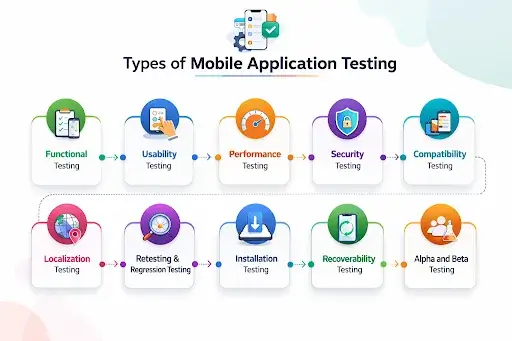
1. Functional Testing
This testing is meant to show that the mobile app is functioning as desired. It verifies that every feature and functionality of the application is functioning well. Functional testing services can be availed to test the user interface, interaction, and other functionality of the mobile app.
For example, if you have a ride-booking application, the QA team will ensure the application correctly displays driver information and their real-time booking status. Functionality testing helps detect defects in the app and ensures it meets user requirements.
2. Usability Testing
Mobile app usability testing, as the name suggests, measures the utility and experience it provides users. It entails gathering users’ feedback through surveys or interviews. As a result, usability testing helps inform decisions to improve the app’s quality and refine mobile app design, ensuring intuitive navigation and seamless user experiences.
For example, when creating an eCommerce package, conduct usability testing. It will ensure users find it easy to navigate and make purchases on the app. Companies such as Airbnb, IBM, and Etsy used usability testing and experienced tremendous growth.
3. Performance Testing
The other software test is mobile app performance testing, which evaluates the app’s speed, scalability, stability, and responsiveness. Through performance testing, you will be able to know that you can deal with heavy traffic in your mobile app. Furthermore, it will take care of user interaction without slowing your app.
If you plan to build a banking or fintech application with an experienced enterprise app development company, performance testing is critical to ensure the app can handle multiple users and high transaction volumes without failures.
It will ensure the app can handle heavy traffic and usage loads. The testing shall enhance the performance of the app and provide a better user experience.
Sub-types include:
- Load testing: tests the performance with the anticipated peak traffic.
- Stress testing: stretches the app to an extent of breaking down to identify the limits of functionality.
- Efficiency testing: the battery consumption and memory used are measured.
- Responsiveness test: confirms tap-to-response and animation fluency.
4. Security Testing
Security is the issue that every business owner is concerned with when creating a high-performing mobile app. Why? Since it will guard your application against unhealthy practices or threats.
This is where mobile application testing of security comes in. The QA team identifies potential weaknesses in a mobile application. They provide recommendations to enhance security. Penetration testing involves creating various cyber-attack scenarios to ensure effective data protection.
In the healthcare sector, it is crucial to keep patient data safe and prevent unauthorized access or potential cyberattacks. The security testing company will cover all potential attacks that could lead to data loss. They will also have two-factor authentication and data encryption to secure the personal information of the user.
5. Compatibility Testing
Compatibility testing is done to ensure the app is compatible with the target device matrix, including screen sizes, operating system versions, and hardware configurations. It is especially important with the disunified Android ecosystem, consisting of thousands of different models of devices.
Testing matrices are usually covered across iOS and Android versions, a variety of screen resolutions and aspect ratios, RAM and processor configurations, and hardware-specific features such as cameras, GPS, and biometric sensors.
This is particularly important for Android and iOS mobile app testing, especially when applications are built through specialized android app development teams or cross-platform frameworks, where device and OS variations can significantly impact performance.
6. Localization Testing
Localization testing is another type of mobile app testing that can ensure the mobile application is adaptable globally. The app’s user interface, features (or functionalities), and content are tested to ensure relevancy across different languages & regions. Testing can result in a lower bounce rate and a smoother user experience.
Localization testing ensures that the content available in the hotel booking app is available in all languages. It complies with local regulations & standards. For example, the app will display pricing in local currency, local taxes or fees, etc.
7. Retesting & Regression Testing
The process of re-running the failed cases after correction of the defects is called retest. It will also be used to ensure that the problems that were encountered during the first testing are fixed and the application is running correctly. The second test is usually conducted before the application is made available for further testing.
Regression testing, in its turn, is the activity of using test cases. It takes care of any modifications made to the code or environment. Regression testing is used to make sure that the current functionality is not affected.
The two tests are intended to ensure that the application is well tested and that problems are addressed before the release of the final version.
8. Installation Testing
The best application can be good, but once it does not install on the users ‘ devices, they will immediately delete it. Therefore, installation testing is rather important to any app before it can be downloaded. During this operation, the QA professionals will test mobile apps with different devices, operating systems, etc.
9. Recoverability Testing
Recoverability testing assesses the graceful restoration of an app’s previous state after disruptions such as incoming calls, network connectivity loss, low-battery shutdown, or an OS-level crash. This is commonly verified through simulators, emulators, and real-active interruption scenarios.
10. Alpha and Beta Testing
Alpha and Beta testing are the most popular terms in software testing, which advocate user validation methodologies. It carries great importance and is indeed quite helpful in building strong confidence to launch products. This ensures the market success of the launched applications.
Android developers simply upload their apps to the Google Play market for Android app testing and let only those users who agree to participate in the test access the apps. iOS developers, on the other hand, use TestFlight to conduct such testing.
| Testing Type | Primary Focus | Key Question Answered |
|---|---|---|
| Functional | Feature correctness | Does every feature work as intended? |
| Usability | User experience | Can users navigate and use the app intuitively? |
| Performance | Speed & stability | Does the app perform well under load? |
| Security | Data protection | Is user data secure from threats? |
| Compatibility | Device/OS support | Does it work across all target configurations? |
| Localization | Regional adaptation | Is the app correctly adapted for each market? |
| Regression | Stability after updates | Have new changes broken existing features? |
| Installation | Setup process | Does the app install and launch reliably? |
| Recoverability | Resilience | Does the app recover gracefully from interruptions? |
| Alpha / Beta | Real-world validation | How do real users respond to the product? |
Mobile App Testing Techniques:
Beyond the types of testing, there are distinct methodological approaches or techniques that determine how testing is structured and executed.
1. Black-Box Testing
In black-box testing, testers test the application as a user would see it, without knowing the code or architecture. Test cases are made totally depending on the expectations and requirements of the application. It is the best in functional and usability testing, and this method simulates the interaction between the product and real end-users.
2. White-Box Testing
White-box testing is a form of testing that examines the application logic, code paths, and architecture. Testers are given full access to the source code and design test cases to confirm particular code branches, loops, and integration points. This method is useful for detecting logic errors, security holes, and even performance bottlenecks that cannot be easily identified in the interface.
3. Gray-Box Testing
Gray-box testing is a combination of the two methods. Testers are somewhat familiar with the system’s internal structure; they generally know the data flow and the API layer, but test mostly as an end user would. This works especially well in the integration testing and security tests.
4. Exploratory Testing
In exploratory testing, the testers explore the application without previous scripts, and they will use experience, intuition, and creativity to identify unforeseen problems. The method is particularly useful during the initial phases of testing or when new features are being tested, because it can reveal edge cases that are not visible in structured test cases.
5. Cloud Testing
Cloud testing is a relatively costly approach because cloud service providers charge fees, but it is also highly applicable, particularly for business application testing or when an entire project involves writing a large volume of apps. Cloud testing will find bugs better, without the need to risk the hardware. It offers a web-based mobile testing platform where testing specialists can deploy, test, and control apps with minimal effort.
The benefits of cloud testing are enormous, including a ready-made, synchronized architecture that eliminates the need for a business to implement on-premises test conditions and no additional requirements for server settings, tools, licensing, etc.
6. Automation Testing
Regardless of the testing team’s proficiency in manual testing, they are unable to eliminate all errors and render mobile apps completely free of glitches. This heightens the demand for automated testing in software. The most effective testing method used even in app development is automation.
Automated testing simplifies checking the app’s compatibility with the new operating system and the backend’s compatibility when upgrading the app.
Step-by-Step Mobile App Testing Process
Mobile app testing follows a structured, step-by-step process to ensure an app’s reliability, security, and user experience. Each stage helps the development team identify issues early, validate functionality, and prepare the application for a smooth and successful launch.
Step 1: Requirement Analysis
The testing team reviews product requirements, user stories, and design specifications to understand what features and flows must be validated. Critical workflows, supported platforms, and edge cases are identified at this stage.
- Deliverables: Defined the scope of testing, identified risk areas, and confirmed the supported device/OS matrix.
Step 2: Test Planning
At this stage, the QA lead defines the testing approach, including scope, tools, timelines, and risk areas. A clear mobile app test plan is also created to guide execution and ensure all critical scenarios are covered.
- Deliverables: Test plan document, tool stack, timeline, manual vs. automated breakdown.
Step 3: Test Case Design
Test cases are written for every feature and scenario in scope. Each test case defines preconditions (the state the app must be in before the test), a sequence of actions the tester performs, and the expected outcome that confirms the app is working correctly.
- Deliverables: Test case repository, prioritized by business impact.
Step 4: Test Environment Setup
The testing environment is configured to simulate real-world usage: real devices and emulators are provisioned, network conditions are simulated (Wi-Fi, 4G, slow 3G), test data is prepared, and third-party integrations (payment gateways, APIs) are configured in their test states.
Step 5: Test Execution
Test cases are executed manually or via automated scripts. While automation improves speed, mobile app manual testing remains essential for validating real user interactions and usability.
Step 6: Regression Testing
After defects are fixed, regression testing confirms that the fixes resolved the issues and that no new issues were introduced. Automated regression suites are particularly valuable at this stage for speed and coverage.
Step 7: Final Reporting and Release Decision
A test summary report is produced that documents all test outcomes, outstanding issues by severity, coverage metrics, and a go/no-go recommendation. The product team reviews the report and makes the final release decision.
Mobile App Testing Best Practices
The distinction between a quality assurance team that releases with confidence and one that has to put out fires after releases is just a matter of following established best practices.
1. Start Testing Early (Shift Left)
The system should be tested throughout the development cycle, not just during Sprint 1. Design bugs or bugs in code are exponentially more expensive to eliminate.
2. Define a Device Matrix
Determine the top 10-15 devices’ market share in your target markets and make sure that every release is testable against this matrix before being released.
3. Automate the Regression Suite
Automatically run your entire regression test suite on each code commit. This helps avoid bugs that have already been corrected from silently recurring.
4. Test on Real Devices
Simulators and emulators can also be used to test at an early stage, although physical devices should be tested before releasing, as hardware-specific problems are revealed when emulating.
5. Test Under Real Network Conditions
Simulate 2G, 3G, and overloaded Wi-Fi networks using network throttling tools. Most performance bugs would only manifest themselves during limited bandwidth.
6. Include Accessibility Testing
Be inclusive by using screen readers (VoiceOver on iOS, TalkBack on Android), ensuring adequate color contrast, and enabling big text mode.
7. Log and Triage Everything
Install crash reporting systems (Firebase Crashlytics, Sentry) to record the actual crash reports and rank the bugs to be fixed based on frequency and the number of affected users.
8. Document Test Cases
Have a living library of test cases, which gets expanded with each release of the features. This preserves institutional knowledge and hires new QA engineers at an accelerated rate.
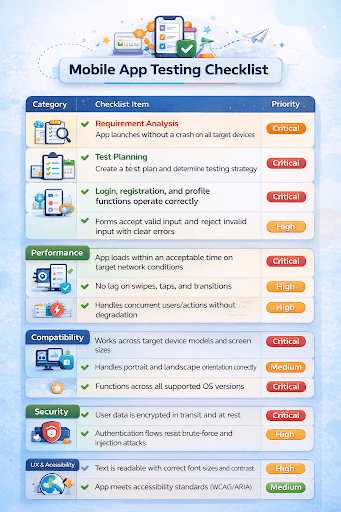
Mobile Application Testing Checklist
Use the following checklist to confirm that all critical dimensions of quality have been validated before releasing your application.
Automated vs. Manual Testing: Choosing the Right Approach
The question is not whether to use manual or automated testing; it is where and when to apply each. Both approaches serve distinct and complementary roles in a comprehensive QA strategy.
| Dimension | Manual Testing | Automated Testing |
|---|---|---|
| Best For | Usability, exploratory, UI/visual validation | Regression, load, smoke, repetitive workflows |
| Speed | Slower requires human execution | Fast runs scripts in parallel |
| Cost | Lower upfront, higher per-cycle cost | Higher upfront (script creation), lower per-cycle |
| Accuracy | Subject to human error | Highly repeatable and consistent |
| Flexibility | Adapts easily to changes | Requires script maintenance with app changes |
| Tools | TestRail, Jira | Appium, Espresso, XCUITest |
| Ideal For | New features, UX validation, edge cases | Regression suites, CI/CD pipelines, load testing |
Mobile App Testing Frameworks
A robust mobile app testing framework helps teams standardize automation and improve testing efficiency across platforms.
This framework provides the structure, tools, and conventions that guide the writing and execution of automated tests. Selecting the right framework depends on the platform, programming language, and testing objectives.
| Framework | Platform | Language | Best For |
|---|---|---|---|
| Appium | iOS & Android | Java, Python, JavaScript | Cross-platform functional testing |
| Espresso | Android only | Java / Kotlin | Fast UI automation within Android apps |
| XCUITest | iOS only | Swift / Objective-C | Native iOS UI automation |
| Robot Framework | Cross-platform | Python (keyword-driven) | Teams are new to automation |
| Selenium (WebDriver) | Mobile web | Multiple | Web-based mobile interfaces |
| Detox | React Native | JavaScript | End-to-end testing for RN apps |
Essential Mobile App Testing Tools:
The right tool stack accelerates testing, improves coverage, and integrates with the broader development pipeline. Below are the industry-standard tools organized by testing function.
| Testing Function | Tools |
| Automated Testing Tools | Appium, Espresso, XCUITest, Detox |
| Manual Testing & Test Management | TestRail, Jira |
| Performance & Load Testing Tools | JMeter, LoadRunner |
| Cloud Testing Platforms | BrowserStack, Sauce Labs |
| Security Testing Tools | OWASP ZAP, Burp Suite |
Challenges in Mobile App Testing and How to Overcome Them
Some common difficulties can arise during mobile app preparation. Understanding these challenges allows teams to reduce risks and improve testing effectiveness.
Challenge 1: Device and OS Fragmentation
Mobile apps must function consistently across many devices, screen sizes, hardware configurations, and operating systems. This fragmentation can make it difficult to ensure consistent performance and appearance, because apps that work well on one device may behave differently on another.
Solution: Define a priority device matrix based on your target market’s usage data. Use a combination of real devices for high-priority configurations and cloud platforms like BrowserStack for broader coverage.
Challenge 2: Network and Performance Variability
Mobile apps are often used under varying network conditions. This includes slow, unstable, or limited connectivity. Testing an app’s performance across different network speeds ensures responsiveness, a smooth user experience, and stability in real-world scenarios.
Solution: Simulate multiple network profiles during performance testing. Test explicitly for offline behavior, slow-connection degradation, and network-switching scenarios.
Challenge 3: Security and Compliance
A prominent challenge in mobile app testing is ensuring that user data is secure and that the app complies with industry regulations. Applications that handle sensitive information must be extensively tested to prevent unauthorised access, data breaches, and violations of privacy standards.
Solution: Integrate security testing into the development lifecycle rather than treating it as a final gate. Use both automated scanning tools and manual penetration testing for comprehensive coverage.
Challenge 4: Frequent Updates and Continuous Regression Risk
Mobile apps are regularly updated with bug fixes, new features, and performance improvements. Each update increases the risk of breaking existing functionality. For this reason, regression testing remains essential to app stability and reliability.
Solution: Invest in a robust automated regression suite that runs on every code commit. CI/CD integration ensures that regressions are caught immediately, not at the end of a release cycle.
Challenge 5: Resource Constraints
Testing teams often face constraints such as limited access to real devices, tight development timelines, and budget restrictions. These limitations can reduce testing coverage and increase the likelihood of issues appearing after the app is released.
Solution: Prioritize test coverage by business impact. Use cloud-based testing platforms to maximize device coverage without physical hardware costs. A focused test strategy that covers critical paths thoroughly is more valuable than sparse coverage across all possible scenarios.
Latest Trends in Mobile App Testing
The mobile app testing landscape is evolving rapidly. Staying current with these trends helps teams improve quality, speed, and efficiency.
a) AI and ML-Powered Testing
AI in mobile app testing is helping teams improve efficiency by enabling smarter automation and faster issue detection. Businesses investing in artificial intelligence development and advanced machine learning solutions are now leveraging AI-driven testing to predict defects, optimize test coverage, and improve release confidence.
Among the major benefits of AI and ML-based testing, one should note the potential to save time and testing costs and to enhance the app’s overall quality. With automated testing, the QA team will be able to complete testing faster and more precisely than when testing is done manually.
b) Shift-Left Testing
The first stage only involves testers testing the app to determine the issues or bugs. Consequently, it is cheaper to fix bugs at an advanced stage. It is a strong methodology since it focuses on early and active testing in the development process.
Simply stated, shift-left testing takes a proactive approach to software testing, aiming to ensure that the root causes of issues are addressed before they become more complex. Through such testing, entrepreneurs can anticipate a high-quality application whose development process is very fast. Finally, providing an added value to their target audience.
c) Cloud-Based Testing at Scale
The testing of cloud-based apps does not involve the necessity of physical equipment. It is a methodology that has cloud-based testing, mobile and web applications infrastructure, and services. It allows testers to run their test cases across a wide variety of devices and operating systems.
Cloud-based apps are tested using a web-based environment. The QA team uses numerous tools and structures to automate their tests and generate reports. Moreover, cloud testing does not require maintaining a large number of physical devices, which can be costly and time-consuming.
d) Test Automation in CI/CD Pipelines
Continuous integration and delivery pipelines have automated tests that verify each code push immediately. This provides a self-balancing loop which ensures the codebase is at all times stable and release-ready, an essential feature in teams with fast release cycles.
e) Testing for AI-Driven App Features
As more mobile apps incorporate AI features, recommendation engines, chatbots, and predictive input, computer vision testing must extend to validate the behavior of machine learning models under varied conditions. This includes testing for accuracy, edge case handling, and graceful degradation when AI predictions are uncertain.
Factors That Affect Mobile App Testing Cost
Before estimating testing costs, businesses often evaluate the overall mobile app development cost, since testing scope, tools, and timelines are directly influenced by the app’s complexity and feature set.
Testing cost is not fixed; it varies significantly based on the nature of the application and the scope of testing required. Understanding these factors helps business owners budget accurately and prioritize testing investments.
Cost Factor | Description | Impact on Cost |
|---|---|---|
| Type of Testing Required | Security and performance testing require more advanced tools and expertise than basic functional testing | High |
| App Size and Complexity | Larger apps with more features, integrations, and workflows require proportionally more testing effort | High |
| Number of Platforms and Devices | Each additional platform (iOS/Android) and device configuration increases the testing scope | High |
| Manual vs. Automated | Automation has a higher upfront investment but a lower per-cycle cost over multiple releases | Medium |
| Testing Methodology | Exploratory testing is faster; comprehensive regression testing is more resource-intensive | Medium |
| Geographic Location of Testers | QA rates vary significantly across markets | Medium |
| Timeline Requirements | Compressed timelines require more parallel resources, increasing cost | High |
Conclusion
Mobile app testing is not a post-development stage but an ongoing practice that permeates each sprint, release, and update. Test scenarios are defined before a single code line is written, and testing ensures a technically developed app becomes an app someone would trust.
The stakes are obvious: crashing, slow apps, data leaks, and broken apps lose customers fast. Reliability, speed, and security are directly linked to well-structured testing.
A good testing strategy incorporates planning, implementation, and improvement. Whether it involves automation or manual validation, testing a mobile app thoroughly ensures better performance, security, and user satisfaction.
Whether you’re building a new app or scaling an existing product, combining development, testing, and application maintenance services ensures long-term success. Businesses that integrate testing with Mobile App Development Services from the start are better positioned to deliver secure, high-performing applications.
Why Choose AppsChopper for Mobile App Testing?
At AppsChopper, we specialize in delivering full-cycle mobile app development and testing services across iOS, Android, and cross-platform applications. Our QA engineers integrate testing into every stage of the development lifecycle, not as an afterthought, but as a core discipline that protects your product, your users, and your brand.
What AppsChopper Brings to Your Testing Strategy?
|
Whether you’re preparing your app for its first launch, optimizing performance, or scaling with advanced features like AI, our expertise across Mobile App Development Services, Artificial Intelligence Development, and end-to-end testing ensures your application is built for long-term success.
FAQs
1. How long does mobile app testing take?
The time spent on mobile app testing is typically 2-8 weeks, depending on the application’s complexity, functionality, device compatibility, and the testing required before launch, including functional and performance testing and security testing.
2. What are the types of mobile app testing frameworks?
Mobile app testing frameworks include Appium (cross-platform), Espresso (Android), XCUITest (iOS), Detox (React Native), and Robot Framework. Both of them embrace various platforms and languages, and automation requirements to test efficiently.
3. What is mobile app security testing?
Mobile app security testing uncovers vulnerabilities and protects the data of users. It consists of penetration testing, authentication checks, data encryption checks, and compliance checks to make the app reliable and secure.
4. How do you ensure data privacy in mobile app testing?
To avoid unauthorized access or data breaches, sensitive data is encrypted, secure APIs are used, an authentication mechanism is implemented, test data is anonymized, and regulations such as GDPR are adhered to.
5. What are the key metrics to track in mobile app testing?
The major measures are crash rate, response time, test coverage, defect density, app load time, and user retention. These are used to compare the performance, stability, and overall quality of apps, both before and after publication.