
Table of Contents
The advent of smartphones has changed how we interact with the world. Mobile apps are taking over all the major things in our lives, like communication, entertainment, shopping, gaming, and more.
There were 2.67 billion smartphone users in 2020, and this number will exceed 7.58 billion in 2026. In other words, it will take less than five years for users to grow by a billion.
The reason behind such rapidly-growing numbers is simple: mobile apps have made life easier for everyone. As a result, the mobile app market offers excellent potential for businesses to expand their reach and revenue.
Businesses exploring mobile app development ideas should focus on solving real user problems while aligning with current market demand and behavior trends.
As a business owner, you won’t want to miss the opportunity to reach out to so many customers. However, building a mobile app is a complex process that requires careful research and planning for proper execution.
Everything you need to know is compiled into this mobile app development guide as one authoritative resource. Whether you are evaluating your first app build or refining a product already in development, you will find practical frameworks, technology comparisons, cost benchmarks, and expert best practices here.
What Is Mobile App Development?
Technically speaking, mobile app development is a process of coding software that runs on smartphones, tablets, wearables, etc. It is a strategic process to create an appealing mobile product by:
- Defining app objectives and exploring market potential
- Designing the layout and creating wireframes for an idea of how it should operate
- Building the app and incorporating necessary features
- Testing the app to ensure everything works as intended
- Launching the app and ensuring visibility across target audiences
Since mobile app development includes software development based on mobile devices, it tries to take complete advantage of the device’s exclusive features.
Mobile app development broadly encompasses:
- iOS app development (iPhone, iPad, Apple Watch)
- Android app development (smartphones, tablets, Android wearables)
- Cross-platform app development (React Native, Flutter)
- Progressive Web App (PWA) development
- Wearable and IoT app development
Benefits of Mobile App Development for Your Business?
The average person spends 5 hours a day on a mobile device and checks their phone nearly 85 times.
If these stats aren’t enough, here are the top reasons why you’ll want to consider creating a mobile app for your business:
1. Boost Brand Visibility and Awareness
Mobile apps can create higher visibility and recognition for your business. The more customers know your app, the more likely they are to recognize it and your business. Therefore, you should ensure your app is user-friendly, responsive, and engaging.
2. Increase Customer Engagement
Your business should invest in mobile app development to seamlessly connect and interact with customers, thus making it a valuable tool for modern businesses. Innovative concepts like apps that pay you to walk show how creative engagement strategies can boost user retention.
3. Enhance User-Experience
A mobile app developed with diligence can help you connect with your customers where they need you most. Building a user-friendly mobile app improves customers’ experience.
4. Improve and Increase Sales
With mobile apps delivering three-times more conversions compared to other portals, a mobile app can increase your customer base, boost your sales of products/services, and lead to greater profits.
5. Viable Marketing Tool
Mobile apps are considered one of today’s best marketing tools. They help your business connect with a higher percentage of your target audience by integrating social media, push notifications, and various other features.
6. Gain Competitive Advantage
A properly developed mobile application is a point of difference in most industries that distinguishes market leaders from the rest. Mobile-first experiences have transformed industries such as healthcare, retail, logistics, and fintech.
What Are the Different Types of Mobile App Development?
It is not limited to Android & iOS mobile app development. PWAs are quickly gaining popularity due to their ability to run on multiple platforms using a single codebase.
- Android App Development – Android apps have a massive customer base and dominate the mobile app industry, with 2.06 million apps in the Google Play Store in 2025. It is, therefore, always the primary choice for developing mobile apps for any business.
- iOS App Development – Businesses choose to develop iOS apps not only to reach Apple users, but also when security is their foremost concern. Due to its great potential for business, iOS apps typically focus on enterprises, particularly targeting countries with better economies and a larger iOS user base, like the US.
- Progressive Web Apps (PWAs) – Progressive Web App (PWA) is newer and is considered the future of app development. It combines the functions of both web apps and native mobile apps to develop progressive web apps.
There are different platforms, as well, requiring segmented mobile app development services. These include native, cross-platform, and hybrid apps.
Which Mobile App Approach is Better: Native, Hybrid, or Web-Based?
There are three main types of mobile apps available to explore mobile app development: native, hybrid, and web-based. All three approaches hold inherent value, but which one is the right approach for your mobile app development project? Let’s jump right in to know.
1. Native Approach
Native mobile apps are considered the most common type of app, built for specific platforms and written in specific languages based on the platform. Objective-C and Swift are used for apps to develop on iOS, whereas Java and Kotlin are used for Android apps. Both Apple and Google developers have their development tools, interface elements, and SDKs.
Advantages of Native Apps:
- Native apps offer better performance in comparison.
- They are interactive, intuitive, and run more smoothly.
- These provide a superior user experience compared to other apps.
- Native apps receive complete support from app stores and app marketplaces.
- Developers can access the full feature set of the selected OS when building a native app.
Disadvantages of Native Apps:
- These require the use of more difficult programming languages than others.
- Expenses are the most costly upfront for native apps.
- They may not be the ideal choice for simple applications.
2. Hybrid Approach
Hybrid apps are a combination of native and web apps. They work across multiple platforms and behave almost like native apps. Hybrid apps are mainly built with HTML, CSS, JavaScript, or other programming languages and run in a web view. Hybrid app development incorporates additional native features to make it more functional.
Advantages of Hybrid Apps:
- Unlike web apps, hybrid apps don’t need a web browser.
- These apps deliver a seamless user experience.
- They are designed to run on a single codebase.
- Hybrid apps give access to a device’s internal APIs to store information offline.
Disadvantages of Hybrid Apps:
- They perform more slowly than native apps.
- They depend on a third-party platform to deploy the app’s wrapper.
- Customization requires investing more money, which could get expensive.
3. Web-Based Approach
Web-based apps, also known as progressive web apps (PWAs), are hybrids of regular web pages and native apps. Being an emerging trend in mobile app development, PWAs can leverage features similar to native apps, like push notifications, device hardware accessibility, improved touch gestures, and more.
Advantages of Web Apps:
- PWAs use a common code base across multiple mobile platforms.
- They are less expensive compared to native apps.
- Unlike other approaches, web-based apps don’t require approval from the app market.
- There is no need to update these apps from app stores.
- Web-based apps are easy to maintain.
Disadvantages of Web Apps:
- They aren’t as feature-rich as others.
- Web-based apps complicate the user experience as they require more steps to use.
- These have poor discoverability if not marketed well.
- They are slower and less responsive than native apps.
- Web-based apps are less interactive and intuitive compared to native apps
Native vs. Hybrid vs. Web-Based Approach: Quick Comparison
| Factor | Native | Hybrid | Web-Based Approach |
| Performance | Excellent | Good | Moderate |
| Dev Cost | High | Medium | Low |
| Time to Market | Slower | Faster | Fastest |
| Platform Access | Full OS APIs | Most APIs | Limited APIs |
| App Store Listing | Yes | Yes | No (optional) |
| Best For | Complex, performance-first apps | Cross-platform on a budget | Content-driven, low-complexity apps |
Choosing the Right Mobile App Development Frameworks
It is impossible to say that there is a right answer. Your audience profile, financial considerations, feature requirements, timeframe, and long-term vision of the product would be the best strategy. Use the following decision-making model:
| Choose Native if: Your application demands the highest possible performance (games, AR/VR, complex animations), integrating with device hardware, or device-specific features. Native applications have the best user experience and performance, but are more costly to develop. |
| Choose Hybrid (React Native / Flutter) if: You would like to release on iOS and Android with a shared codebase. This model provides a good balance of performance, speed of development, and cost, and is a favourite amongst start-ups and expanding businesses. |
| Choose PWA if: You have a content-intensive product, are in the early-validation phase, or are interested in accessibility and reach. PWAs are inexpensive and highly portable, with performance and device integration restrictions. |
Most startups and growth-stage companies are best served with a hybrid solution (React Native or Flutter) because it offers the best performance, cost, and market speed. Many enterprise organizations continue to use native apps where they are most needed, but are adding internal tooling with PWAs.
Best Trends in Mobile App Development to Remember Moving Forward
The world of mobile apps is ever-changing and dynamic, with new technologies and evolving user expectations. Staying updated with mobile app development trends helps businesses remain competitive and future-ready.
1. Artificial Intelligence (AI) and Machine Learning (ML)
Artificial intelligence-based capabilities, such as chatbots, voice assistants, predictive analytics, and personalized recommendations, are changing the user experience in all apps.
Many organizations are also investing in artificial intelligence development services to build smarter, more adaptive mobile applications.
2. Internet of Things (IoT) Integration
Smart devices like wearables, home automation systems, and healthcare devices are becoming more intertwined with mobile apps that allow real-time access and control of data. This growth is also driving demand for wearable app development services, especially in sectors like fitness and healthcare.
3. Progressive Web Apps (PWAs)
PWAs are rapidly gaining popularity because they are low-cost, load quickly, and can be used on multiple devices, eliminating the need to download apps in an app store.
4. Augmented Reality (AR) and Virtual Reality (VR)
AR and VR are also boosting user interaction across sectors such as gaming, retail, real estate, and education through immersive experiences.
5. Blockchain Technology
Mobile apps are adopting blockchain to enhance security, transparency, and safe transactions, with fintech and supply chain apps particularly widespread.
6. Cloud-Based Mobile Applications
Cloud integration enables applications to store and process data effectively, enhancing scalability, performance, and collaboration.
7. Enhanced App Security and Privacy
As the levels of cyber threats rise, companies are dedicating greater attention to more sophisticated security measures, such as biometric authentication and the use of secure data storage.
The Mobile App Development Process: From Idea to Launch
Developing a fully-functioning mobile app involves a systematic approach known as the mobile app development lifecycle, which covers every stage from idea validation to post-launch optimization.
Knowing the essential steps involved in building one can keep you ahead of the competition. Here are the seven essential mobile app development steps:
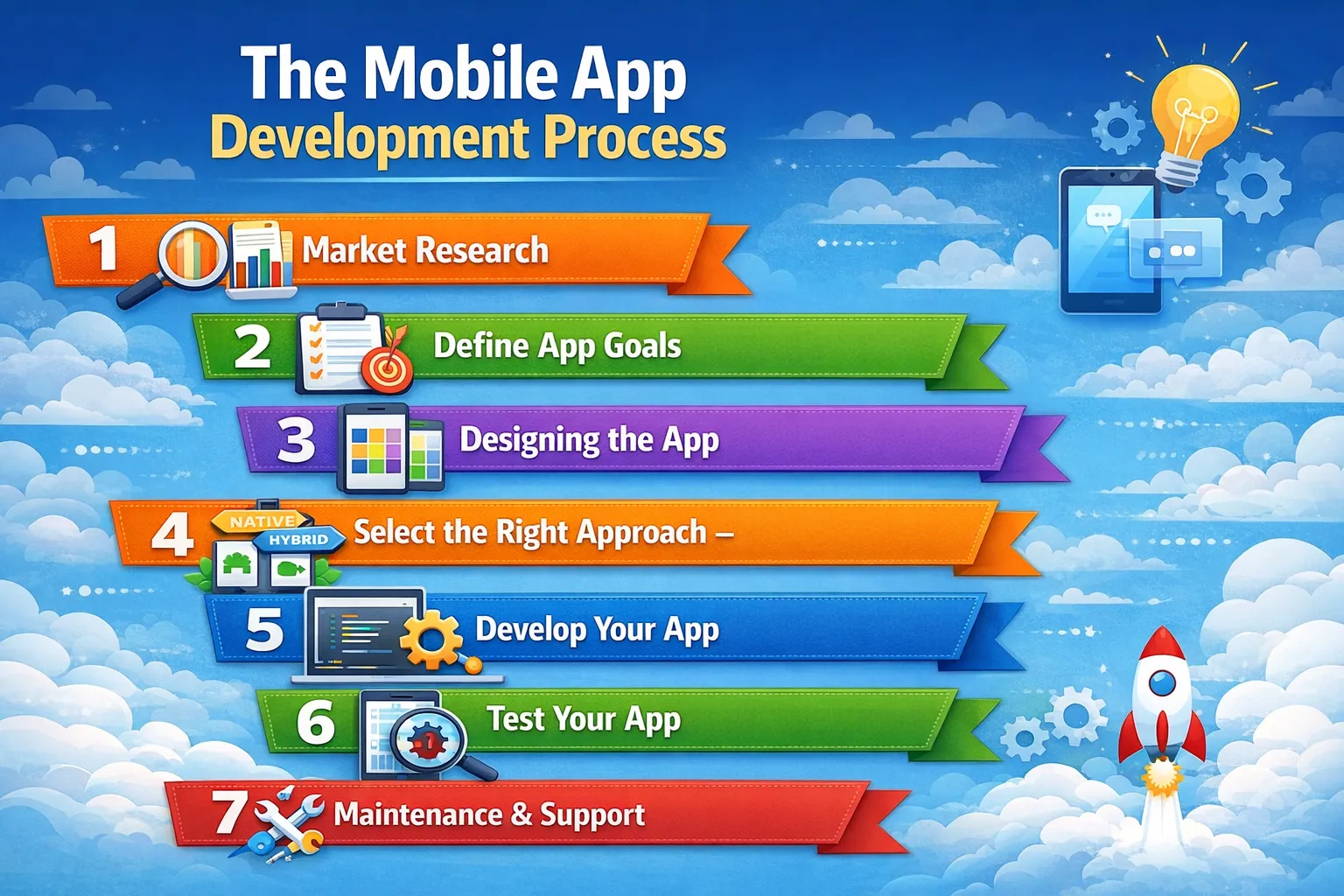
 Step 1: Market Research
Market research mainly involves market/sector-domain data analysis that helps you find out user preferences and capital movement by observing what’s working in the market and what’s not. All these things will help you determine how to make your app better than the rest.
Step 2: Define App Goals
Once you’re done with the research phase, it is time to focus on the objectives of the app. Understanding the purpose behind building the app is crucial if you want it to succeed.
Step 3: Designing the App
Designing your app is another significant element responsible for making your app successful. Mobile apps built with good design automatically attract zillions of potential users. UX/UI design, advanced features, multi-touch gestures, and more are some main components of the design phase.
Step 4: Select the Right Approach –
You must’ve sorted out everything related to your next mobile app development, yet selecting the right approach for developing a mobile app can be daunting. You can choose your approach based on your audience, time, and budget.
Step 5: Develop Your App
Once you are sure about your approach to developing an app, you should take a step forward and get in touch with a professional app development company with experience in your domain.
Step 6: Test Your App
You must’ve put everything into developing your app, but what if your users find glitches while using your app? That would leave a bad impression on them. Thus, before making it live for your potential users, you should test the app concept in numerous real-world scenarios to ensure it functions properly.
Step 7: Maintenance and Support
Your work is not done once your app is developed. It will require timely updates, maintenance, and support. You’ll need reliable app maintenance and support services to keep your mobile app updated and glitch-free.
Mobile App Development Technologies: Back-End, Front-End, and APIs
Awareness of the three layers of mobile app technical architecture can help non-technical stakeholders make more informed decisions on scope, vendor choice, and timelines.
1. Front-End (Client Side)
All that the user sees and touches on his or her mobile screen is the front-end. It contains all the visual elements, layouts, navigation menu, buttons, forms, animations, and transitions. The approved UI/UX designs are used to develop a front-end that must meet platform-specific design guidelines (Apple Human Interface Guidelines (iOS) and Material Design (Android).
React Native and Flutter are widely used front-end frameworks for hybrid apps. In the case of native iOS, SwiftUI is the next generation. In the case of native Android, Jetpack Compose grows in popularity.
2. Back-End (Server Side)
The back-end is a server, database, and application logic, which drives the app behind the scenes. The back-end receives requests when the user logs in, searches for a product, or submits a form. The back-end issues the request, the database and business rules handle it, and the right response comes back.
Common mobile app back-end platforms include Node.js, Python (Django/Flask), Ruby on Rails, and Java/Spring. The most popular cloud providers are AWS, Google Cloud, and Microsoft Azure used to provide back-end infrastructure.
3. Application Programming Interface (API)
The interfaces between the front-end application and the back-end server are the APIs (Application Programming Interfaces). They specify the request and response data formats, such as how your application will fetch the order history of a user in the database, or how it will send or accept a payment through Stripe.
The most typical API architectures in mobile development are RESTful API and GraphQL. The APIs should be properly designed to provide good performance, security, and scalability of the app.
Modern app development services leverage scalable architectures, cloud infrastructure, and API-driven systems to ensure performance, flexibility, and future scalability.
Mobile App Testing: Ensuring Quality Before Launch
Regardless of how good your development team is, bugs are shipped along with untested apps. The quality gate between your code and your users is comprehensive QA testing. One critical bug during the initial rollout can create negative feedback that will keep the app store down in the ranking over months.
Types of Mobile App Testing
| Testing Type | Description |
| Functional Testing | Checks the features as per requirements (buttons, forms, workflows). |
| Usability Testing | Determines the ease and usability of the app by real target users. |
| Performance Testing | Tests load time, memory usage, battery consumption, and load behavior. |
| Security Testing | Detects threats such as authentication and data security threats. |
| Compatibility Testing | Makes the app compatible with devices, screen sizes, and OS versions. |
| Regression Testing | Re-You test features that have been changed after the change to identify unwanted problems. |
| User Acceptance Testing (UAT) | End users validation before launching the app. |
Manual vs. Automated Testing
Manual testing consists of a QA engineer tapping through the app and simulating user delays using their fingers, and writing notes about unforeseen behavior. Manual testing is most beneficial in exploratory testing as well as usability testing.
Automated testing involves scripts and testing frameworks (e.g., Appium, Detox, XCTest) that run through large amounts of predefined test cases at a high rate. Regression testing requires automated testing because agile development requires frequent changes in code to be tested in order to be validated.
Best practice: Repetitive, high-volume regression cases should be tested using automated testing, and exploratory, usability, and edge-case testing should be done using manual testing. The majority of the professional development teams operate simultaneously.
Mobile App Development Best Practices
The process of creating a successful mobile application extends past coding and includes strategic planning, user-centric design, and continuous optimization. Adhering to industry best practices will make sure your app is high-performing, scales smoothly, and provides a fluid user experience.
1. Prioritize User-Centric Design
Your application must be user-friendly, simple to use, and attractive. Pay attention to clean interfaces with regular patterns and streamlined interactions to create a more usable interface and less friction.
2. Focus on Performance Optimization
Users want quick and responsive applications. Maximize load time, reduce software size, and be cross-platform and operating system.
3. Ensure Strong Security Measures
Security must be built in. To ensure the security of user data, engage in data encryption, secure API, multi-factor authentication, and frequent security audits.
4. Build for Scalability
Prepare your application architecture to accommodate future expansion. A scalable backend will support your app as it grows in its number of users, data, and features without performance problems.
5. Follow Platform Guidelines
By following platform-specific guidelines (iOS and Android), you can guarantee consistency and a better chance of approval on app stores, and also improve user experience.
6. Optimize for Offline Functionality
Provide users with the capabilities to use necessary features without an internet connection, where required. Offline features enhance the experience and retention of users.
Mobile App Development Cost Breakdown
With an ever-increasing demand for mobile apps, mobile app development shows no sign of stopping at all. Many businesses want to create mobile apps to engage with more customers, but are concerned about the costs. Here, we have categorised the approx mobile app development cost with regard to complexity:
1. Simple Apps
As the name suggests, simple apps don’t contain many complex features and are simple. They don’t require API integration, back-end, standard UI components, etc. Simple apps include features like email subscriptions, social media logins, calendars, and others.
Due to the absence of complex features, simple apps cost around $20,000 – $40,000 and take approximately 400 hours to build.
2. Apps With Moderate Complexity
Unlike simple apps, moderate apps do include more features, but not as many as complex apps. These apps demand custom UI features, payment features, API integration, headset and tablet adaptation, back-end server, and more.
Being moderate, these types of apps cost you somewhere between $40,000 – $80,000 and might take around 500-800 hours to develop.
3. Apps With Sophisticated Functionalities
Apps with advanced features are considered to be more time-consuming than others. These apps include multi-language support, third-party integrations, custom animations, complicated back-end, professional design, real-time features, and more.
Being more complex than others, these apps cost around $75,000 – $150,000 and might take around 800-1500 hours or more to complete.
Post-Launch Maintenance and Support
Publishing your app is a milestone, not a finish line. The post-launch phase is where the long-term success of your app is determined. Without active maintenance, even well-built apps deteriorate, OS updates break functionality, performance degrades under growing user loads, and security vulnerabilities emerge.
What Post-Launch Maintenance Covers?
- Bug Fixes: Addressing crashes, UI glitches, and functional errors reported by users or monitoring tools
- OS Compatibility Updates: Apple and Google release major iOS/Android updates annually, and apps must be tested and updated to maintain compatibility
- Performance Optimisation: As user bases grow, back-end infrastructure and query performance must be tuned accordingly
- Security Patches: Vulnerabilities in third-party libraries and framework dependencies require prompt remediation
- Feature Updates: User feedback, analytics data, and market changes drive ongoing product evolution
- App Store Compliance: Both Apple and Google update their policies periodically apps must remain compliant to avoid removal
Plan for ongoing maintenance costs of approximately 15–25% of your initial development budget annually. Apps that are actively maintained and regularly updated consistently outperform stagnant competitors in user retention and store ratings.
How to Choose a Mobile App Development Company?
Knowing how to choose a mobile app development company is critical, as the right partner can directly impact your product’s success. Go beyond price and find the company that knows what your business is all about and has a history to go by.
Test their portfolio, technical skills, and development process so they can work on your project. Good communication, well-defined processes, and strong quality assurance are signs of a stable team.
Also, take into account their after-sales services and eagerness to give references to clients. Working with experienced healthcare app developers can be especially beneficial for industry-specific applications.
On discovery calls, enquire about their experience with requirement changes, project management, timelines, security, and final handover. These tips will help you find a partner that is not only competent but also reliable in the long-term.
Questions to Ask in Discovery Calls
- What do you do in the face of requirements changes during the project?
- How do you have your sprint review and approval process?
- What will be the main contact during the project?
- What is your approach to timeline slippage?
- Which security practices do you have as a default?
- How do handoff and knowledge transfer appear at the end of the projects?
Conclusion
One of the most high-leverage investments that can be undertaken by a modern business is mobile app development, but it solely relies on the quality of your strategy, process, and execution partner.
Whether you are exploring new mobile app development ideas or scaling an existing product, success depends on choosing the right strategy and execution partner.
The businesses that win with mobile are those that approach it as a product discipline, not just a technology project. They invest in research before writing code, design for users before aesthetics, test before launch, and commit to continuous improvement after they ship.
AppsChopper is ready to be your partner at every stage of this journey. Whether you are starting with a rough idea or looking to scale an existing app, our team brings the technical expertise, strategic insight, and collaborative process to turn your vision into a product your users will love.
We would love to hear your comments relating to the post. Got some other thoughts? Drop us word through our contact page.
Frequently Asked Questions
1. What is the mobile app development timeline?
It is determined by your app’s characteristics, such as its complexity and the functionality we will be integrating. Simple application software takes 3-6 months. More complex apps will take more time, so submit your requirements to us to get a more precise estimate.
2. Which platform should I choose for my app, iOS or Android?
The decision also largely relies on your business goals and target market. You can even do both in case you want to reach as many people in the market as possible.
3. Will my mobile app be sufficiently secure?
Ensuring your team follows industry best practices and stays abreast of security trends and vulnerabilities will help keep your app secure. Some of the measures you can take include user authentication, encryption, secure APIs/server-side technologies, security patches, and rigorous security testing during development.
4. What are the ongoing maintenance costs for a mobile app?
Continuous maintenance involves frequent activities such as bug fixes, performance tuning, compatibility with new operating systems, security, and feature additions to the product, driven by user feedback.