Table of Contents
Mobile application downloads will generate a global revenue of $357.58 billion by 2026, so the opportunity is massive but competitive.
But, when it comes to the startup app development, the question becomes a dilemma among most entrepreneurs: how do they launch faster, scale more effectively, and provide the best experience?
The decision between native and hybrid app development is one of the most important a startup can make at the outset. This not only affects development schedules and costs but also directly impacts performance, user experience, scalability, and long-term product success.
Whereas native applications are the most speedy and tightly integrated with the devices, hybrid solutions have quicker go-to-market and cost efficiency because of a common codebase.
Each approach offers distinct advantages, and understanding them is crucial before committing time and resources. This guide will deconstruct native vs. hybrid app development, their advantages and disadvantages, and how to select the right approach based on your startup’s goals, budget, and growth stage.
What Is a Native App?
A native app is a mobile application developed to run on a single platform, either iOS or Android, and created with the official programming language and development tools for that platform.
Native iOS applications are coded in Swift or Objective-C using Apple’s Xcode IDE, whereas Android native applications are coded in Kotlin or Java using Android Studio.
Native applications interact with the hardware and operating system APIs without any middleware. This first-mover advantage provides them with unparalleled access to the capabilities of their devices, like the camera, GPS, Bluetooth, biometric authentication, and push notifications.
A native application is like software built directly for a specific operating system, allowing it to fully leverage platform-level capabilities without abstraction layers.
Native App Examples
Many of the world’s most performance-sensitive and design-intensive apps are built using native development, including Apple Maps (iOS), Google Maps (Android), Snapchat, Instagram, Spotify, Gmail (iOS), Robinhood, and Airbnb (iOS)
Core characteristics of native apps
- Complete access to all native APIs and hardware of the device.
- Optimized execution and rendering on target hardware.
- Fluent in compliance with platform UI/UX design standards (HIG on iOS, Material Design on Android).
- Only offered in the App Store or Google Play.
- Maximum security because sandboxing is done by the platform.
What Is Native App Development?
The term native app development refers to building a mobile app exclusively for a particular mobile OS, whether you go with Android app development or iOS development. Native apps are built with programming languages and tools that are specific to a single platform. For example, native iOS apps are usually written in Swift or Objective-C, and native Android apps are written in Java or Kotlin.
Pros of Native App Development
The development of native applications offers the best performance, user experience, and access to all device features, which is why it is the best choice for high-quality applications.
- Rich User Experience and Functionality – Native apps tend to be much more intuitive. Their design easily integrates with the phone’s features, making the experience seamless than ever before.
- Better UX Standards – Native apps follow different UX/UI standards for Android and iOS, making it easier for users to understand and navigate the apps more smoothly.
- Fast and Responsive – Apps built with a native approach offer the fastest, most reliable, and most responsive user experience.
- Wider Device Functionality – Native makes it super easy to tap into the camera, microphone, compass, accelerometer, and swipe gestures, showcasing the device’s innovative features.
- Personalization – Native development is one way to maintain a high design standard and deliver a tailored experience for all your product users.
- Highly-Secured – Native apps emphasize users’ data protection. The powerful software used in this approach makes the developed apps highly secure.
Cons of Native App Development
It might also have drawbacks, such as requiring individual codebases, being more expensive and time-consuming to develop, and being too challenging to implement with limited resources in a startup.
- More Than One Codebase – iOS apps will not run on Android’s code, and vice versa, so with the native approach, different codebases for every platform would be needed.
- Expensive Development – As native app development requires different codebases for different operating systems, two separate developers will be required, adding extra cost.
- Time-Consuming Development – These apps require more time to be built. If you need apps for iOS and Android, you need to think about simultaneous development.
What Is a Hybrid App?
A hybrid application is a mobile app that is developA hybrid app typically reaches its first testable build 30–50% faster than building two separate native apps, because the codebase is shared. A straightforward hybrid app MVP may take 8–14 weeks, while an equivalent native dual-platform build may require 14–24 weeks. Timeline depends heavily on feature complexity, design requirements, backend integration, and testing depth.ed with web technologies, typically HTML, CSS, and JavaScript, and then encased in a native shell container that enables it to be installed and distributed via app stores. Basic application logic is implemented in a WebView component, an embedded browser within the app.
Contemporary hybrid architectures have moved well beyond simple wrappers for WebViews. Modern hybrid systems use a JavaScript bridge to access native device APIs, enabling hybrid applications to use features such as cameras, accelerometers, and GPS, but with some latency compromises compared to pure native features.
Emerging cross-platform frameworks are essential in creating smooth hybrid apps. The hybrid development today has advanced. Frameworks such as React Native and Flutter are not mere WebView-based applications, but get compiled to either close to native components or even native code, reducing the performance disparity with fully native apps by a factor of several.
Hybrid App Examples
There are numerous popular applications that have a huge user base but are built on hybrid architectures, like Twitter (early), Instagram (early), Untappd, Pacifica, TripAdvisor, Sworkit, NHS App (UK), and Evernote.
Core characteristics of hybrid apps
- Developed using a single codebase that is run on various platforms.
- Quick time-to-market over two distinct native applications.
- Reduced start-up development and maintenance costs.
- May does not always conform to platform-specific UI conventions.
Pros of Hybrid App Development
Hybrid application development is a more economical and faster approach to developing applications across multiple platforms with a single codebase, suitable for situations where rapid launch and reaching a large audience are required.
- Multiplatform Reach – Going hybrid means you’ll create a single app for all available platforms. That means one app will work on both Android and iOS and various browsers.
- Faster to Build – Cross-platform apps are faster to build compared to native ones because of one codebase that runs across all the platforms out there.
- Faster Go-To-Market – Built with a single codebase, hybrid apps are less complex to produce, meaning you can launch apps more quickly than native ones.
- Cost-Effective Development – If cost is a concern for you, cross-platform app development is your surefire way to go. With one single codebase, the development involves less money comparatively.
- Easily Scalable – Hybrid apps are easier to scale to another platform. Once you’ve built for one platform, you can launch on another with ease.
- Easier to Change and Update – Developers don’t have to work with each platform separately; they can make changes once, and they’ll be applied to all platforms that hybrid work across.
Cons of Hybrid App Development
It can be associated with performance constraints, inconsistencies in the UX, and an extra complexity in the process of ensuring smooth cross-platform functionality.
- Performance Issue – Hybrid apps use an intermediate layer to run across platforms, which can impact performance in highly demanding use cases, although for most standard applications, the difference is minimal.
- UX Suffering – Hybrid apps won’t please both platforms in terms of the UX aspect. The differences are subtle but can be frustrating for your iOS and Android app users.
- Glitches – Another concern with cross-platform apps is that their loaded content is a bit glitchy. Sometimes the loading time is slow.
Native vs Hybrid: Architecture
Understanding the underlying architecture helps clarify why these two approaches differ in performance, cost, and capability.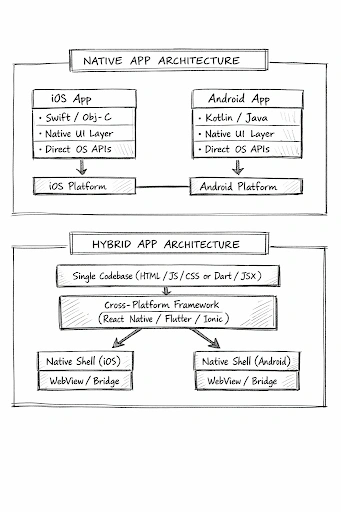 Key Differences: Native vs Hybrid App Development
The native or hybrid app development choice is based on your startup goal, app needs, budget, and many other significant considerations. Now, we shall consider the main distinguishing features of the two.
| Factor | Native App Development | Hybrid App Development |
| Codebase | Separate per platform (iOS + Android) | Single shared codebase |
| Languages | Swift/Obj-C (iOS), Kotlin/Java (Android) | JavaScript, Dart, HTML/CSS |
| Performance | Highest direct OS execution | Good to very good (framework-dependent) |
| User Experience | Best-in-class, platform-consistent | Good, but may vary across platforms |
| Development Cost | Higher (two teams, two codebases) | Lower (one team, one codebase) |
| Time to Market | Slower (parallel builds required) | Faster (single build for all platforms) |
| Device API Access | Full, unrestricted | Partial (via plugins/bridges) |
| Security | Platform-native, highly secure | Dependent on the framework and web layer |
| Maintenance | Heavier (two separate updates needed) | Lighter (update once for all platforms) |
| Scalability | Platform-specific scaling effort | Easier cross-platform scaling |
| App Store Optimization | Generally stronger metrics | Competitive if built on a robust framework |
| Best For | Complex, high-performance, feature-rich apps | MVPs, budget-constrained startups, simple-to-medium apps |
Hybrid vs Native App Performance
The most decisive factor is usually identified as hybrid vs native app performance, and deservedly so. The effects of performance on user retention, ratings of the app store, and conversion rates are quantifiably affected.
| Performance Scenario | Native | Hybrid (React Native / Flutter) |
| Standard UI navigation | Excellent | Excellent |
| Complex animations | Excellent | Good (near-native) |
| Offline-first data apps | Excellent | Good |
| Camera / AR features | Excellent | Moderate |
| Real-time gaming | Excellent | Not recommended |
| Content/e-commerce apps | Excellent | Excellent |
| Enterprise dashboards | Excellent | Excellent |
Development Cost: Native App vs Hybrid App
Cost is often a determinant of startups and growth-stage companies. To see the full picture of hybrid app development vs. React Native app development or native costs, one has to consider more than just hourly rates.
Key insight: The perceived savings in hybrid development costs are largest in the short term (MVP phase). Native apps can be more economical over a 3-5 year product lifecycle if the product becomes more complex.
| Cost Factor | Native iOS + Android | Hybrid (React Native / Flutter) |
| MVP Development (simple app) | $40,000 – $80,000 | $25,000 – $50,000 |
| Mid-complexity app | $80,000 – $200,000 | $50,000 – $120,000 |
| Team size needed | iOS dev + Android dev + QA + PM | 1–2 cross-platform devs + QA + PM |
| Annual maintenance | 15–20% of build cost (per platform) | 10–15% of build cost (shared) |
These numbers are market averages and will vary widely depending on your development partner’s location, the team’s seniority, the complexity of the designs, the integration needs of the backends, and third-party API fees. Having a seasoned mobile app development partner, such as AppsChopper, can also help scope it on the first day.
Popular Tools & Frameworks
The landscape of hybrid app frameworks has matured significantly. Today, developers working on native vs cross-platform mobile app development have access to production-grade tools that power applications used by billions of people. Here’s an overview of the most widely adopted options in 2026:
Native Frameworks
| Framework / Language | Platform | Key Strengths |
| Swift | iOS | Apple’s modern, fast, safe language for iOS/macOS |
| Objective-C | iOS | Legacy iOS language is still maintained |
| Kotlin | Android | Google’s preferred modern Android language |
| Java | Android | Mature, widely supported Android language |
| Xcode | iOS | Apple’s official IDE; deep OS integration |
| Android Studio | Android | Google’s official IDE; full Gradle support |
Hybrid / Cross-Platform Frameworks
| Framework | Backed By | Technology | Key Strengths |
| React Native | Meta (Facebook) | JavaScript + React | Near-native performance; large community; hot reload |
| Flutter | Dart | High-performance, beautiful custom UIs; single widget tree | |
| Ionic | Ionic Team | HTML/CSS/JS + Angular/React/Vue | Web-first; great for content apps and PWAs |
| Xamarin / MAUI | Microsoft | C# / .NET | Strong for enterprise; code sharing with .NET backend |
| Cordova / PhoneGap | Apache / Adobe | HTML/CSS/JS | Older WebView-based; suitable for simple apps |
React Native and Flutter are the current two leading options for startups developing cross-platform mobile apps. React Native has the advantage of the massive JavaScript and React ecosystem, whereas Flutter has the flexibility of the UI and better performance due to its own rendering engine.
Native vs Cross-Platform Mobile App Development
Hybrid and cross-platform are terms that are used interchangeably, but they have different meanings in native vs cross-platform mobile apps development discussions.
1. Native Development
Native development involves building separate apps for each platform—one for iOS using Swift or Objective-C, and one for Android using Kotlin or Java. This ensures peak performance, platform-specific UX, and full access to device features, though it requires separate codebases and larger development effort.
2. Hybrid Apps
Hybrid apps are built using a single codebase wrapped in a native container, allowing them to run on multiple platforms. Modern frameworks like React Native and Flutter provide near-native performance for most applications, though some highly complex or hardware-intensive features may require additional native modules.
3. Cross-Platform
React Native and Flutter are in this place. Single codebase, but renders actual native UI components (React Native) or its own high-performance rendering engine (Flutter). Most use cases are best served by the best of both worlds.
Note: When comparing hybrid and native app trade-offs, a traditional hybrid app (Ionic/Cordova) works differently from React Native or Flutter, which run at significantly lower performance levels.
How to Choose the Right Approach for Your Startup?
There is no universally correct answer when it comes to native vs hybrid app development. The right choice depends on a precise evaluation of your startup’s stage, goals, technical requirements, and available resources.
Choose Native App Development If:
- You require intensive connection with the hardware of devices (IoT, wearables, sophisticated camera functionality)
- One of the priorities is security (fintech, healthcare, enterprise authentication).
- You are developing a platform-defining, long-term product in which UX differentiation works as a competitive moat.
- You have the finances and time to develop individual teams and build at the same time.
- Your application should be compliant with platform standards.
Choose Hybrid App Development If:
- You are creating an MVP so that you can test product-market fit before investing in a full native build.
- The financial aspect is real, and you must trim down the initial development expenditure.
- The time to market is a point of concern, and you need to release both platforms at the same time.
- Your application is either content, information, or e-commerce-based (moderate performance requirements)
- On the one hand, you have to enter both the Android and iOS markets on the first day with minimal engineering resources.
- JavaScript or web technologies are the main expertise of your team.
- You intend to innovate and update frequently, across platforms.
Recommended path by startup stage
| Stage | Recommended Approach | Rationale |
| Pre-seed / MVP | Hybrid (React Native or Flutter) | Maximum speed, minimum cost, validate before scaling |
| Seed / Early Growth | Hybrid with native modules where needed | Scale features quickly, drop-in native bridges for complex APIs |
| Series A+ | Evaluate migration to native or continue scaling hybrid | Data-driven decision based on performance needs and user feedback |
| Established product | Native (if product-market fit is proven) | Invest in platform excellence to differentiate from competitors |
Selecting the appropriate mobile app design and development approach requires experience and careful consideration. Startups benefit from understanding the differences between native and hybrid development, evaluating factors such as performance, cost, scalability, and platform integration before making a decision.
The Startup-Specific Decision Path
For most early-stage startups, the decision pathway looks like this:
- MVP / Idea Validation: Launch quickly and cost-effectively on both iOS and Android → Hybrid (React Native or Flutter)
- Seed / Early Growth: Scale features and integrate performance-critical modules → Hybrid with selective native components
- Series A / Post-Product-Market Fit: Optimise key features for performance and UX → Evaluate migration to native where needed
- Established Product: Deliver fully optimized, high-performance apps → Native development for critical modules or full app
| Pro Tip Startups: Most successful applications are hybrid during MVP, which is quick and cost-effective to prove the market and only transition to native development of the core and performance-dependent features when product-market fit is established. This is a theatrical method that is the most efficient in terms of speed and resource use without necessarily compromising quality. |
Why AppsChopper for Your Mobile App Project?
At AppsChopper, we not only create apps but also collaborate with you to turn your idea into a scalable, high-performing digital product. Working with multiple clients, we have deciphered that no two clients would have the same expectations. That being said, we assist them as per their needs and technology goals as we have years of experience in building diverse apps.
It is one of the reasons we assist you in selecting the appropriate technology stack based on your business needs, rather than trends.
We have a team of experienced developers, designers, and strategists who collaborate with you throughout, from ideation and architecture planning through development, testing, and after-sales services. We provide high-performance, security, and an outstanding user experience, whether you are creating an MVP in a short time or a feature-rich application.
Our focus on transparency, quick implementation, and long-term prosperity is the distinguishing feature. We do not simply sell a product, but we develop solutions that are scalable to your business.
With us, you also have a strong technology partner that helps your business launch faster, optimise costs, and stay competitive in a fast-changing mobile world.
Conclusion
There is no right answer; the native vs. hybrid app will not have a winner at this point in time, as far as your startup is concerned.
Native development provides exclusive performance, safety, and user experience. It makes the right decision when your product needs a strong integration with the device, real-time, or is pursuing long-term goals towards a platform-defining product.
With hybrid development, speed, cost-efficiency, and cross-platform access are achieved with a single codebase. It is the correct option for startups with proven ideas, developing MVPs, or constrained by budgetary and time limitations. Modern systems such as React Native and Flutter have enabled hybrid development to be much more effective than it was several years ago.
The trick of aligning your business goals with the appropriate strategy is the most essential one, rather than pursuing a certain ideal. Measure the requirements of your performance, your budget, the expertise of your team, your schedule, and your target platforms. Then put the call in faith.
And if you prefer an established mobile development partner to make that decision and put it together right, we at AppsChopper are willing to do the same.
FAQ
Q1: What is the main difference between native and hybrid app development?
Native applications develop different apps on both platforms (iOS and Android) with platform-specific languages such as Swift and Kotlin. In hybrid app development, one common codebase is developed using technologies such as React Native, Flutter, or HTML/CSS/JS and is then used across multiple platforms. Native is more performance-optimised and better integrated with the device; hybrid is cheaper and faster to develop.
Q2: Is hybrid app development suitable for startups?
For the majority of startups in the initial stage, hybrid development is a terrific starting point. It enables you to target iOS and Android platforms quickly at a fraction of the cost of developing two native apps. The React Native and Flutter frameworks provide near-native performance that is available in most startup app scenarios.
Q3: How long does it take to develop a hybrid app vs a native app?
A hybrid app typically reaches its first testable build 30–50% faster than building two separate native apps, because the codebase is shared. A straightforward hybrid app MVP may take 8–14 weeks, while an equivalent native dual-platform build may require 14–24 weeks. Timeline depends heavily on feature complexity, design requirements, backend integration, and testing depth.
Q4: Can hybrid apps match native app performance?
For most standard use cases, content apps, e-commerce, social apps, and SaaS tools, modern hybrid frameworks like Flutter and React Native deliver performance that is close to native and sufficient for excellent user experiences. However, for graphics-intensive apps, real-time processing, or advanced hardware integration, native development still holds a clear performance advantage.
Q5: Why do native apps perform better?
Native apps are compiled directly for the platform, use the native rendering engine, and interact with hardware without intermediate layers, resulting in faster performance, smoother animations, and lower battery usage.
Q6: Where do hybrid apps stand today?
Modern hybrid frameworks like React Native and Flutter can achieve near-native performance for most standard applications. The differences are most noticeable in graphics-intensive, real-time, or highly hardware-dependent apps.