
Table of Contents
As technology keeps advancing, capabilities that once seemed out of reach are now becoming mainstream and more accessible. One of the more recent technological innovations is computer vision. In 2026, the global computer vision market size is projected to be valued at $24.14 billion.
In simple terms, computer vision is an advanced AI technology that can see through the use of cameras and sensors. Like a human being, computer vision technology can make sense of people, places, and objects. It can be used effectively across many industries and applications, but one sector that the technology is particularly beneficial for is retail. By leveraging custom app development services, retailers can integrate computer vision into mobile and in-store applications to improve customer experience, drive sales, and optimize operations.
In this blog, you will learn about what computer vision is, why it matters in retail, the roadmap to implementing computer vision in retail, real life use cases, and the difference between computer vision and deep learning applications in retail.
What is Computer Vision and Why Does It Matter in Retail?
Computer vision is an AI technology that allows cameras and sensors to see, interpret, and act on visual data. These machines use deep learning and neural networks to learn how to react based on the presented data.
Talking about that, Computer vision in retail is used to understand what is happening in a store. When fully trained, it can analyze customer behavior, inventory, and security threats through detecting people and tracking movement. By implementing this technology, retail businesses can maximize ROI by improving customer experience, restock time, and security measures.
It also automates tasks that would normally require human attention, saving time, reducing errors, and providing practical insights. As a result, retailers benefit from quicker restocking, better customer experience, and smarter business decisions.
Why Retailers are Implementing Computer Vision?
By leveraging visual intelligence, businesses can make smarter decisions, reduce errors, and responsibilities in real time to customer behavior and operational needs.
Store layout optimization:
Insights from traffic patterns and product engagement allow stores to reorganize displays for smoother flow and better sales performance.
Reduced operational errors:
Automated recognition and tracking reduce mistakes in pricing, stocking, and checkout which improves accuracy.
Checkout line and wait time management:
Tracks lines and customer flow at checkout or service areas to optimize staffing and reduce congestion
Energy and resource management:
Cameras and sensors can monitor lighting, HVAC usage, and other store systems to optimize energy consumption.
Smart pricing and dynamic promotions:
Uses visual cues and inventory levels to suggest price adjustments or targeted promotions in real time
Computer vision empowers retailers to optimize both efficiency and customer satisfaction, turning visual data into actionable insights that drive measurable business results.
Types of Computer Vision and What They Do?
Computer vision in retail requires different tasks to fulfill various goals. Below is a breakdown of computer vision tasks, what they do, and the end goal.
Computer Vision Task | What it Does | End Goal |
| Object Detection | Identifies and locates objects within an image or video | Detects what an object is and where it appears using bounding boxes |
| Image Segmentation | Divides an image into pixel-level regions | Separates objects from the background for more precise analysis |
| Image Classification | Assigns a label to an entire image | Determines what category an image belongs to |
| Motion Analysis and Tracking | Detects and follows moving objects across frames | Tracks customers, carts, or products in real time to study movement patterns |
| Scene Reconstruction | Creates a 3D model or spatial map from images or video | Understands the layout of a store, shelves, or spaces to enable navigation and planning |
In retail, object detection and image classification are commonly used together. Retail computer vision systems need to understand what they are seeing and determine where they appear in a store. By combining these tasks, retailers can build computer vision systems that are tailored to their operational goals.
Behind the Scenes: A Computer Vision Roadmap and How it Works?
Each step of the computer vision process plays a role in helping retailers streamline operations and deliver better customer experiences. Below is a breakdown of each stage of the retail computer vision system, showing how it works to help decision-makers make choices that benefit their business and their customers.
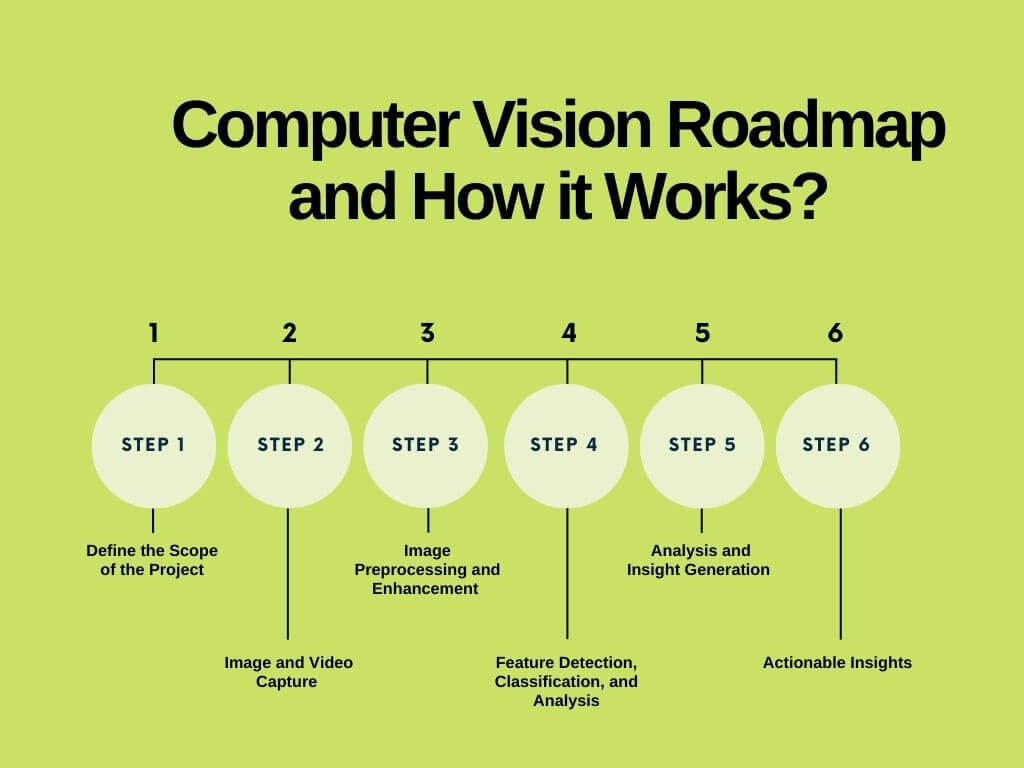
 Step 1: Define the Scope of the Project
In any computer vision project, it is important to clearly define the problem that needs solving. The goal of the project will affect the dataset used to train the model, along with the different aspects of computer vision that will be used.
Step 2: Image and Video Capture
Once the cameras and sensors are installed into the store based on layout and infrastructure, they begin capturing images and video feeds. Retailers building mobile applications to integrate these feeds can leverage the benefits of Swift for iOS apps to optimize performance and stability.
Step 3: Image Preprocessing and Enhancement
Before the visual data needs enhancement to ensure accuracy. This can involve resizing images, reducing noise, adjusting contrast, or correcting lighting conditions so that the system can clearly interpret what it sees.
Step 4: Feature Detection, Classification, and Analysis
Next, the computer vision system identifies important visual elements such as edges, colors, shapes, and movement. At this point in the computer vision pipeline, the system can classify and distinguish between products on shelves, customer movement, and general shopping behavior based on the project goal.
Step 5: Analysis and Insight Generation
Then, the data is analyzed to generate actionable insights. The system may determine that a shelf needs restocking, flag suspicious behavior, or identify high-traffic areas within the store. These insights are then translated into decisions or alerts that support store operations.
Step 6: Actionable Insights
The final step is using the insights to drive real-time actions or automation within the retail environment, helping retailers respond quickly and operate more efficiently.
Understanding how computer vision systems operate helps businesses leverage computer vision to stay ahead in a competitive environment, optimize operations, and enhance customer experiences.
Real Life Applications: Computer Vision Use Cases in Retail
As computer vision technology advances, the uses for it in retail continue to expand. The following use cases highlight someone of the most impactful ways computer vision is being applied in retail today and the computer vision tasks that make each use case possible.
Use Case 1: Virtual and Augmented Reality
Computer vision technology lets customers preview and try clothing, accessories, and makeup through smartphones and tablets. Augmented reality targets customers that prefer to shop online. Implementing computer vision this way can increase ROI by improving customer confidence, reducing returns, and driving higher conversion rates. Learn more about mobile app development trends that support these types of interactive experiences.
Type of Computer Vision used for Virtual and Augmented Reality
Image classification:
Identifies the type of product being tried on, like clothing, accessories, or makeup.
Object detection:
Detects facial features and body so virtual products can be placed accurately on customers.
Use Case 2: Inventory Management
One of the biggest benefits of retail vision is that it can automate the inventory and restocking process. Often, the cameras and sensors are mounted onto retail equipment which allows it to notify staff about empty shelves and misplaced products.
Type of Computer Vision used for Inventory Management
Image classification:
Confirms if the correct products are placed in the correct locations.
Object detection:
Detects products, empty shelves, or misplaced items in real time.
Use Case 3: Retail Heat Maps
Heat maps allow retailers to determine the high traffic and low traffic areas in a store. This is used to study customer movements, test new layouts, and verify merchandising strategies. Overall, retailers can use heat maps to optimize store design, improve product placement, and enhance customer experience.
Type of Computer Vision used for Retail Heat Maps
Object detection:
Tracks customer movement throughout the store to identify traffic patterns.
Motion analysis and tracking:
Measures the paths customers take, time they spend viewing each product or shelf, and patterns of movement to generate accurate heat maps.
Use Case 4: Personalized Marketing Campaigns
Customer vision supports personalized marketing by analyzing how customers interact with store layouts, displays, and products. These insights help retailers tailor promotions, in-store messaging, and recommendations.
Type of Computer Vision used for Personalized Marketing Campaigns
Image classification:
Categorizes customer behavior based on shopping patterns and engagement.
Object detection:
Identifies interactions with products, shelves, or promotional displays.
Use Case 5: Theft Prevention and Loss Reduction
Computer vision has made it possible for retailers to heighten their security. Using AI and visual monitoring, algorithms can analyze movements and interactions with products and flag unusual activity to staff. Ultimately, this reduces inventory loss and makes retail environments safer.
Type of Computer Vision used for Theft Prevention and Loss Reduction
Object detection:
Monitors products on shelves to detect removal or unusual handling.
Motion analysis and tracking:
Follows customer movement patterns to identify suspicious behavior, such as lingering near high-value items and repeated visits to the same area of the store.
Image classification:
Differentiates between normal shopping patterns and potential theft scenarios.
Computer vision for retail can have very versatile applications. By combining the various computer vision tasks, retailers can transform visual data into solutions that allow stores to stay competitive in an increasingly technology-driven retail landscape.
Computer Vision vs. Deep Learning: Understanding the Difference and Applications in Retail
Often, computer vision and deep learning are mentioned together. However, they play different roles within AI systems. Below is a table that distinguishes the two to help retailers see how these systems are built and applied in modern stores.
Feature | Computer Vision | Deep Learning |
| Definition | A field of AI that allows systems to see, understand, and interpret image and video data | A subset of AI that uses neural networks to learn patterns from data |
| Primary purpose | Focuses on extracting meaning from visual information | Specialized approach focused on training neural networks |
| Techniques used | Image processing, object detection, tracking, and segmentation | Neural networks, specifically Convolutional Neural Networks (CNNs) |
| Data requirement | Can work with smaller datasets or rule-based methods | Needs large volumes of labeled data to perform effectively |
| Performance | Effective for structured visual tasks and controlled environments | Highly accurate for complex and large-scale visual tasks |
| Retail examples | Shelf monitoring, heat maps, gesture recognition, basic analytics | Product recognition, checkout-free systems |
Retail AI vision combines both computer vision and deep learning to deliver accurate and scalable insights for businesses. These technologies enable retailers to analyze visual data more effectively, support automation, and improve decision-making.
Conclusion
Computer vision is proving to be particularly beneficial in the retail setting. Businesses looking to stay ahead in the technology-driven retail market should leverage computer vision to optimize operations, improve customer experiences, and drive smarter business decisions.
Investing in iOS app development services allows businesses to integrate advanced computer vision features directly into mobile platforms, enabling seamless, interactive experiences such as personalized recommendations, virtual try-ons, and real-time inventory insights.
FAQ
1. How does computer vision protect customer privacy?
Retail computer vision systems can be configured to comply with privacy regulations and protect sensitive customer information. Features such as anonymization, blurring, or aggregated data analysis ensure that individuals cannot be personally identified without consent. This allows stores to gain actionable insights while respecting privacy standards.
2. Can computer vision help reduce retail theft and shrinkage?
Yes. Computer vision-powered surveillance can detect unusual behavior in real time, flag potential theft, and alert staff immediately. This proactive monitoring helps reduce shrinkage and enhance retail safety without relying solely on human observation.
3. What ROI can retailers expect from computer vision solutions?
Retailers implementing computer vision often see faster restocking, reduced out-of-stock incidents, improved customer engagement, and more efficient store operations. These benefits translate into cost savings, higher sales, and better data-driven decision-making, making the ROI measurable within months after deployment.
4. How does computer vision compare to RFID in retail?
While RFID tracks items via tags, computer vision analyzes visual data to understand inventory, customer behavior, and store operations. Computer vision provides richer insights like shelf monitoring, gesture recognition, and checkout-free shopping without requiring every product to have a tag, making it a more scalable solution for dynamic retail environments.
5. Does computer vision in retail raise privacy concerns?
Like any technology that collects visual data, computer vision can raise privacy concerns. However, by implementing privacy-compliant systems and following best practices (such as anonymization and secure data handling), retailers can benefit from advanced insights while addressing customer privacy. For the latest developments in the field, retailers can follow computer vision news to stay informed on regulations and innovations.
6. How long does it take to implement computer vision in a retail store?
Retailers often want to know the timeline for deploying these systems. Implementation can vary depending on store size, technology selection, and integration needs. A typical rollout starts with a pilot program in one location, followed by scaling across multiple stores. Early pilot results often appear within a few weeks, while full deployment may take several months.
Pilot Phase:
2-4 months. This includes initial assessment, hardware installation, software configuration, testing, and model training. Most retailers start with a single location to prove the concept and work out integration issues.
Early Results:
4-8 weeks after it goes live. Retailers typically begin seeing actionable insights within 1-2 months of system activation, though accuracy continues improving as the system collects more data.
Full Multi-Store Deployment:
6-18 months. Small chains (5-10 stores) typically complete rollout in 6-9 months, while medium chains (25-50 stores) need 9-12 months. Large chains with 100+ stores often require 12-18 months for full deployment.
7. How much does it cost to implement computer vision in retail?
For single stores, an initial pilot can cost anywhere from $15,000 to $75,000. The price includes hardware, software licenses, installation, and initial configuration. Simple applications like counting number of customers fall on the lower end, while comprehensive solutions with shelf analytics and loss prevention are on the higher end.
Ongoing costs can be $500 to $5,000 per month. Monthly fees cover cloud processing, software updates, analytics, and support. Pricing depends on the features and the amount of data processed.
Multi-store rollouts can cost $20,000 to $50,000 per store. Costs per location decrease with scale due to volume discounts and streamline deployment process.